A driving licence (DL) is a must if you want to drive a scooter, bike or car legally in India. It is also a valid identity proof. Today, most driving licence work can be done online on the Parivahan Sarathi portal, and you visit the RTO only for the driving test (and some states even allow tests at authorised driving centres).
In this guide, you will learn in very simple words how to do driving licence apply online, how to do DL download and print, how to do renewal, how to update your mobile number, address and date of birth, how to upgrade to a 4-wheeler, how to upload documents and check DL status, with special notes for Madhya Pradesh (MP).
Driving Licence 2027
| Point | Details |
|---|---|
| Issued by | Your state’s Regional Transport Office (RTO), under MoRTH rules |
| Online portal | sarathi.parivahan.gov.in |
| Step 1 | Learner’s Licence (LL), valid for 6 months |
| Step 2 | Permanent DL after at least 30 days of LL and a driving test |
| Minimum age | 16 years (gearless up to 50cc, with parent consent); 18 years (geared bikes and cars) |
| Learner licence fee | About ₹150 + ₹50 test fee |
| DL fee | About ₹200 + ₹300 driving test fee |
| Renewal fee | About ₹200 (late fee extra) |
| DL download | DigiLocker or mParivahan app (valid digital copy) |
| Official portal | Click Here |
Types of Licence and Age Limits
| Vehicle type | Minimum age | Notes |
|---|---|---|
| Gearless two-wheeler up to 50cc | 16 years | Parent or guardian consent needed |
| Geared two-wheeler (bike) | 18 years | MCWG class |
| Light motor vehicle (car) | 18 years | LMV class |
| Transport / commercial vehicle | 20 years | Usually needs an LMV licence first |
Documents Required for Driving Licence
| Document | Examples |
|---|---|
| Age proof | Aadhaar, birth certificate, 10th marksheet, passport, PAN |
| Address proof | Aadhaar, voter ID, electricity bill, passport, rent agreement |
| Passport-size photo and signature | Uploaded online |
| Self-declaration of fitness (Form 1) | For non-transport licence |
| Medical certificate (Form 1A) | If you are 40 or older, or for transport licence |
| Learner’s licence | For permanent DL application |
Tip: If your Aadhaar is linked with your mobile, many states allow Aadhaar-based (faceless) services, so you may not need to upload many documents.
Driving Licence Apply Online: Step-by-Step
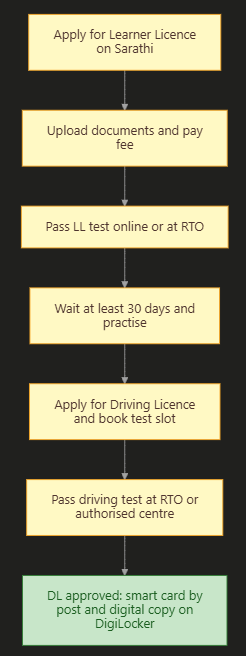
Step 1: Apply for Learner’s Licence (LL)
- Open the Sarathi portal. To open it directly, Click Here.
- Select your state (for example, Madhya Pradesh).
- Click on “Learner Licence” and then “Apply for Learner Licence”.
- Choose to submit via Aadhaar authentication (recommended) or without Aadhaar.
- Fill in your personal details, address and vehicle class (MCWG for bike, LMV for car).
- Upload documents, photo and signature (if asked).
- Pay the fee online.
- Take the LL test:
- In many states, you can take the online LL test from home if you used Aadhaar authentication.
- Otherwise, book a slot and take the test at the RTO.
- After passing, download your LL from the portal.
Step 2: Apply for Permanent Driving Licence
- After 30 days (and within 6 months) of getting your LL, open the Sarathi portal again.
- Click on “Driving Licence” and then “Apply for Driving Licence”.
- Enter your LL number and date of birth.
- Check your details and pay the fee.
- Book a slot for the driving test.
- Go to the RTO (or authorised driving test centre) on the date with your LL, documents and vehicle.
- After passing the test, your DL is approved. The smart card DL is sent by post, and you can download it on DigiLocker or mParivahan.
LL to DL Process Sequence
Driving Licence Fees 2026
Fees are set under the Central Motor Vehicles Rules. Some states add service or smart card charges, so the final amount can be a little different.
| Service | Fee (approximate) |
|---|---|
| Learner’s licence | ₹150 |
| LL test / repeat test | ₹50 |
| Permanent DL | ₹200 |
| Driving test | ₹300 |
| Renewal of DL | ₹200 |
| Late renewal | ₹300 + ₹1,000 for each year of delay |
| Duplicate DL | ₹200 |
| Change of address / details | ₹200 |
| Addition of a new vehicle class | ₹500 |
| International Driving Permit | ₹1,000 |
What does this chart show? Getting a new licence (LL plus DL with tests) costs about ₹700 in total. Renewing on time costs only about ₹200, but late renewal adds ₹1,000 for every year of delay, so renew on time.
Driving Licence Apply Online MP (Madhya Pradesh)
| Point | Details |
|---|---|
| Portal | sarathi.parivahan.gov.in (select Madhya Pradesh) |
| LL test | Online / Aadhaar-based options where available, or at RTO |
| Driving test | At your district RTO or authorised centre, after booking a slot |
| Download | DigiLocker or mParivahan |
Steps for MP
- Open the Sarathi portal and select Madhya Pradesh.
- Apply for Learner Licence with Aadhaar authentication and pay the fee.
- Pass the LL test and download your LL.
- After 30 days, apply for Driving Licence, book a test slot at your district RTO, and pass the test.
Driving Licence Download and Print
Method 1: DigiLocker
- Open DigiLocker. To open it, Click Here.
- Log in with your Aadhaar-linked mobile.
- Search for “Driving License” under Ministry of Road Transport and Highways.
- Enter your DL number and fetch it.
- Your DL is saved and can be downloaded or shown to traffic police.
Method 2: mParivahan App
- Install the mParivahan app.
- Log in with your mobile number and OTP.
- Go to “Virtual DL” or “RC / DL” and add your DL number.
- Your virtual DL is shown in the app.
Is a digital DL valid? Yes. A DL shown in DigiLocker or mParivahan is accepted as a valid document under the IT Act and Motor Vehicles rules.
Driving Licence Print (Duplicate Smart Card)
If your DL card is lost or damaged, apply for a duplicate DL on Sarathi:
- Open Sarathi, choose your state, and go to “Driving Licence” then “Services on DL (Renewal / Duplicate / AEDL / IDP / Others)”.
- Enter your DL number and date of birth.
- Choose “Issue of Duplicate DL”.
- Upload documents (FIR / police report may be asked for a lost card) and pay the fee.
- The new card is printed and posted to you.
Driving Licence Renewal
| Point | Details |
|---|---|
| When to renew | You can apply up to 1 year before expiry and within the grace period after expiry |
| Validity (non-transport) | Usually till age 40 (or 20 years), then 10 years at a time till 50, then 5 years |
| Medical certificate | Form 1A needed if you are 40 or older |
| Fee | About ₹200; late fee ₹1,000 per year of delay |
Steps for DL Renewal
- Open Sarathi, select your state, and click “Services on DL”.
- Enter your DL number and date of birth.
- Choose “Renewal of DL”.
- Upload Form 1A (if 40+), photo and signature.
- Pay the fee and submit.
- Your renewed DL is posted to you and updated on DigiLocker.
Driving Licence Update: Mobile Number, Address and Date of Birth
Update Mobile Number in DL
MoRTH has asked all licence holders to keep their mobile number updated so they get challan, renewal and other alerts.
- Open the Parivahan / Sarathi portal and select “Mobile Number Update” (Aadhaar-based) under DL services.
- Enter your DL number and date of birth.
- Verify using Aadhaar OTP.
- Enter your new mobile number and confirm with OTP.
Update Address in DL
- On Sarathi, go to “Services on DL” and enter your DL number and date of birth.
- Choose “Change of Address in DL”.
- Upload new address proof and pay about ₹200.
- Submit. The updated DL is sent by post.
Update Date of Birth in DL
- On Sarathi, choose “Change of Date of Birth in DL” under DL services.
- Upload a valid date of birth proof (birth certificate, 10th marksheet or passport).
- Pay the fee and submit. The RTO may ask you to visit with original documents.
Driving Licence Upgrade to 4 Wheeler (Add New Vehicle Class)
If you have a bike licence (MCWG) and want to drive a car (LMV):
- On Sarathi, apply for a Learner Licence for the new class (LMV) using your existing DL details.
- Pass the LL test for LMV.
- After 30 days, apply for “Addition of Class of Vehicle” (endorsement) under DL services.
- Pay the fee (about ₹500 for addition of class plus test fee).
- Book a slot and pass the car driving test.
- Your DL is updated with the LMV class.
Driving Licence Upload Documents
If your application shows “Upload Documents” pending:
- Open Sarathi and select your state.
- Go to “Upload Document” (under Learner Licence or Driving Licence menu).
- Enter your application number and date of birth.
- Upload clear scans (usually JPG / PDF within the size limit shown).
- Submit and check the status.
Driving Licence Status and Number
Check Application Status
- Open Sarathi and select your state.
- Click on “Application Status”.
- Enter your application number and date of birth, then the captcha.
- Click Submit to see the status.
How to Find Your Driving Licence Number
| Situation | What to do |
|---|---|
| You have the card | DL number is printed on the front (state code + RTO code + year + number) |
| Card lost but DL in DigiLocker | Open DigiLocker and see “Issued Documents” |
| Card lost and not in DigiLocker | Use “Find Application Number” on Sarathi or contact your RTO |
Common Mistakes and How to Avoid Them
| Mistake | What happens | How to avoid it |
|---|---|---|
| Applying for DL before 30 days of LL | Not allowed | Wait at least 30 days after LL |
| Letting LL expire (6 months) | Must apply for LL again | Book your driving test within 6 months |
| Late renewal | ₹1,000 extra per year of delay | Renew on time |
| Old mobile number in DL | You miss challan and renewal alerts | Update mobile number with Aadhaar OTP |
| Using agents or fake sites | Extra money and fraud risk | Use only parivahan.gov.in and sarathi.parivahan.gov.in |
Driving Licence Helpline
| Purpose | Contact |
|---|---|
| Parivahan helpdesk | Through the “Contact Us” / helpdesk on parivahan.gov.in |
| helpdesk-sarathi@gov.in | |
| Local help | Your district RTO |
Frequently Asked Questions (FAQ)
How can I do driving licence apply online?
First apply for a Learner Licence on sarathi.parivahan.gov.in, pass the LL test, and after 30 days apply for a Driving Licence, book a test slot, and pass the driving test.
How can I do driving licence download?
Log in to DigiLocker and fetch your DL under Ministry of Road Transport and Highways, or add your DL number in the mParivahan app.
Is a DL in DigiLocker valid?
Yes. A DL shown in DigiLocker or mParivahan is accepted as a valid document.
How can I apply for a driving licence in MP?
Open sarathi.parivahan.gov.in, select Madhya Pradesh, apply for a Learner Licence, pass the LL test, and then apply for a Driving Licence and pass the driving test at your district RTO.
What is the fee for a driving licence in 2026?
About ₹150 plus ₹50 test fee for a Learner Licence, and about ₹200 plus ₹300 test fee for a permanent DL. States may add small service charges.
How can I renew my driving licence online?
On Sarathi, choose “Services on DL”, enter your DL number and date of birth, choose “Renewal of DL”, upload Form 1A if you are 40+, pay the fee and submit.
How can I update my mobile number in my driving licence?
Use the Aadhaar-based mobile number update option on the Parivahan / Sarathi portal, enter your DL details, verify with Aadhaar OTP, and enter the new number.
How can I change my address in my driving licence?
On Sarathi, choose “Change of Address in DL”, upload new address proof, pay about ₹200 and submit.
How can I upgrade my licence to a 4-wheeler?
Apply for a Learner Licence for LMV, pass the LL test, wait 30 days, apply for “Addition of Class of Vehicle”, pay the fee and pass the car driving test.
How can I print my driving licence?
You can download and print it from DigiLocker. For a new physical card, apply for a duplicate DL on Sarathi.
How can I check my driving licence status?
On Sarathi, click “Application Status”, enter your application number and date of birth, and submit.
Can I take the learner licence test from home?
In many states, yes. If you apply with Aadhaar authentication, you can take the online LL test from home.
What is the validity of a driving licence?
For non-transport licences, it is usually valid till age 40 (or 20 years), then for 10 years at a time till 50, and then 5 years at a time.
Sources We Used
- Parivahan Sarathi portal: learner licence, driving licence and DL services
- BankBazaar: learner licence and driving licence fees in 2026
- Daily Excelsior: driving licence rule changes in 2026 (August 2026)
- Patrika: MoRTH advisory on linking mobile number with DL (October 2025)
Important Links
These important links are collected for you by yojanabot.com. Click on any link to open the page.
| What You Need | Link |
|---|---|
| Application Form (Learner Licence and DL on Sarathi) | Click Here |
| Official Site (Parivahan Sewa) | Click Here |
| Driving Licence Download (DigiLocker) | Click Here |
| DL Renewal, Duplicate, Update and Status (Sarathi) | Click Here |
| Aadhaar Card Download and Update | Click Here |
| Pan Card Apply Online | Click Here |
| Other Yojana Info | Click Here |
| Home Page | Click Here |