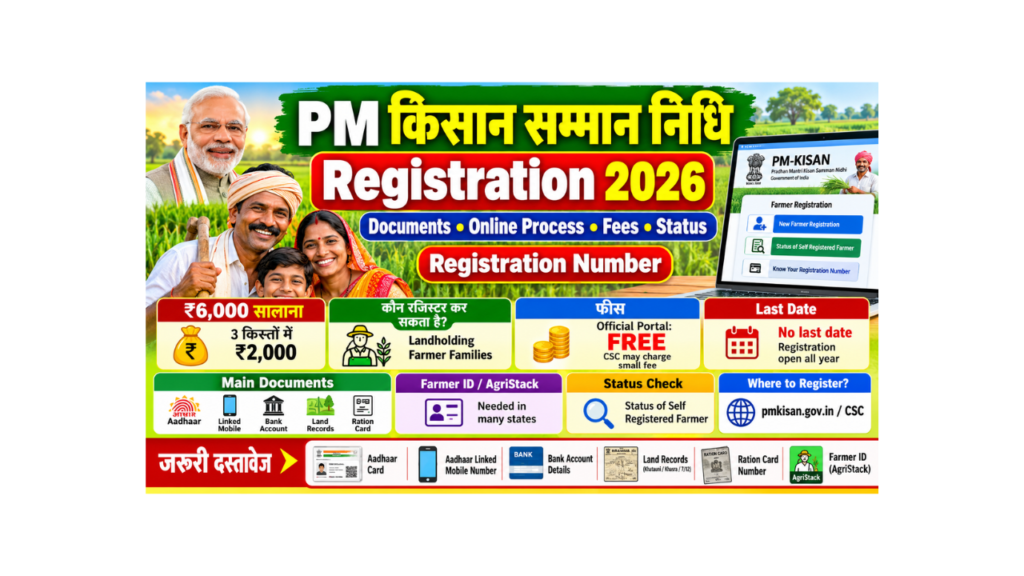
If you are a farmer and have not yet joined PM Kisan Samman Nidhi, you are missing ₹6,000 every year. The good news is that registration is free and can be done online from your mobile in a few minutes, if you keep the right documents ready.
In this guide, you will learn in very simple words which documents are required for PM Kisan Samman Nidhi registration, how to do online registration, whether there are any fees, how to check your registration status, and how to find your PM Kisan registration number (registration number kaise nikale).
| Point | Details |
|---|---|
| Scheme name | Pradhan Mantri Kisan Samman Nidhi (PM-KISAN) |
| Benefit | ₹6,000 per year in 3 installments of ₹2,000 |
| Who can register | Landholding farmer families with cultivable land in their name |
| Main documents | Aadhaar, Aadhaar-linked mobile, bank account, land records, ration card |
| Farmer ID | Needed for new registration in 14 states (as of August 2025) |
| Registration fee | Free on the official portal (CSCs may charge a small service fee) |
| Registration last date | No last date; registration is open all year |
| How to register | Online on pmkisan.gov.in, or at a CSC, or through your patwari / agriculture office |
| Status check | “Status of Self Registered Farmer” on the portal |
| Helpline | 155261 / 011-24300606 / 1800-115-526 |
| Official portal | Click Here |
Who Can Register for PM Kisan?
Eligibility Checklist
- You must be a farmer family (husband, wife and minor children) that owns cultivable land in its own name.
- Your land records must be in your name. Land bought after 1 February 2019 may not be accepted, except land you got by inheritance.
- Only one member of a family can get the benefit.
- You must have an Aadhaar card and a bank account linked with Aadhaar.
Who Cannot Register? (Exclusion List)
| Category | Can they get PM Kisan? |
|---|---|
| Institutional landholders (trusts, companies) | No |
| Families with a present or former constitutional post holder | No |
| Present or former ministers, MPs, MLAs, mayors, district panchayat chairpersons | No |
| Serving or retired government employees (except Group D / Class IV / MTS) | No |
| Retired pensioners getting ₹10,000 or more per month (except Group D / Class IV / MTS) | No |
| People who paid income tax in the last assessment year | No |
| Registered professionals like doctors, engineers, lawyers, CAs and architects | No |
PM Kisan Samman Nidhi Registration Documents Required
This is the most important part. Keep these documents ready before you start the form.
| Document | Why it is needed | Notes |
|---|---|---|
| Aadhaar card | Identity proof and e-KYC | Name in the form must match Aadhaar exactly |
| Mobile number linked with Aadhaar | For OTP during registration and e-KYC | Keep the phone with you |
| Bank account details | To receive ₹2,000 installments | Account must be linked (seeded) with Aadhaar for DBT |
| Land records | Proof that you own farm land | Khatauni, Khasra, 7/12 extract, Jamabandi, ROR or land passbook, as used in your state |
| Ration card number | To check family details (one family, one benefit) | Asked in the registration form |
| Farmer ID (AgriStack) | Needed for new registration in many states | Get it from your state’s Farmer Registry |
| Scanned land document (PDF) | Must be uploaded in the online form | Keep the file small, as per the size limit shown on the form |
| Passport-size photo | Sometimes asked at CSC or offline | Keep one ready |
Simple Tips for Documents
- Your name must be the same in Aadhaar, bank account and land records. A small spelling mistake can stop your payment.
- Get your bank account seeded with Aadhaar (ask your bank to enable it for DBT).
- If the land is in your father’s name, you cannot register for it until the land is transferred to your name.
- Scan your land document clearly and save it as a small PDF before you start.
Document Checklist Before You Start
- Aadhaar card
- Mobile phone with Aadhaar-linked number
- Bank passbook (account number and IFSC)
- Land record (Khatauni / Khasra / 7-12 / Jamabandi)
- Ration card number
- Farmer ID (if your state needs it)
- Scanned PDF of land record
What Is Farmer ID and Why Is It Needed?
Farmer ID is a unique digital ID for farmers under the government’s AgriStack programme. It is linked to your land records and helps the government give benefits to the right person.
- From 1 January 2025, Farmer ID was made mandatory for new PM Kisan registrations in 10 states, covering most beneficiaries.
- By August 2025, it was mandatory for new registrations in 14 states (as per the Ministry of Agriculture in Parliament).
- The first 10 states were Andhra Pradesh, Assam, Bihar, Chhattisgarh, Gujarat, Madhya Pradesh, Maharashtra, Odisha, Rajasthan and Uttar Pradesh.
How to Get a Farmer ID
- Visit your state’s Farmer Registry portal (for example, upfr.agristack.gov.in for Uttar Pradesh), or use the Farmer Registry mobile app of your state.
- You can also visit a CSC / Jan Seva Kendra or a camp organised in your village.
- Give your Aadhaar, Aadhaar-linked mobile and land record details.
- After verification, you get a Farmer ID. Use it in your PM Kisan registration.
PM Kisan Registration Process: Online Step by Step (Kaise Kare)
You can register yourself on the official portal. It takes about 10 to 15 minutes if your documents are ready.
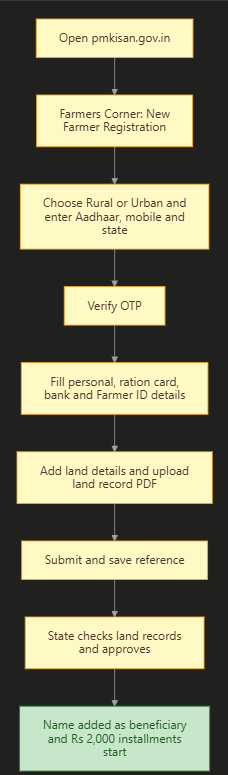
Step 1: Open the New Farmer Registration Page
- Open the PM Kisan portal. To open it directly, Click Here.
- In the “Farmers Corner” section, click on “New Farmer Registration”.
- Choose “Rural Farmer Registration” if you live in a village, or “Urban Farmer Registration” if you live in a town.
Step 2: Enter Aadhaar and Mobile Number
- Enter your Aadhaar number and mobile number.
- Select your state.
- Type the captcha and click “Get OTP”.
- Enter the OTP sent to your mobile. You may also need to verify an OTP sent to your Aadhaar-linked mobile.
Step 3: Fill Your Personal and Bank Details
- Fill in your name (as in Aadhaar), gender, category and other details.
- Enter your ration card number and family details, if asked.
- Enter your bank account number and IFSC code.
- Enter your Farmer ID, if your state needs it.
Step 4: Add Your Land Details
- Choose “Single” or “Joint” ownership of land and click “Add”.
- Enter your Khata number, Khasra / Survey / Dag number and land area.
- Enter the date and way you got the land (for example, inheritance), if asked.
Step 5: Upload Documents and Submit
- Upload your land record (PDF).
- Check all details carefully.
- Click “Save” or “Submit”.
- You will see a “registration successful” message. Save the reference number or screenshot.
Step 6: Approval by the State
- Your application goes to the state government for checking (usually the patwari / lekhpal, tehsil or agriculture office).
- After approval, your name is added as a PM Kisan beneficiary, and you start getting installments.
PM Kisan Registration Process
PM Kisan Registration Offline and Through CSC
| Method | Where to go | What to take | Best for |
|---|---|---|---|
| Online self registration | pmkisan.gov.in on your phone | All documents and scanned land PDF | Farmers who can use a smartphone |
| CSC (Jan Seva Kendra) | Nearest CSC | Aadhaar, mobile, bank passbook, land records | Farmers who want help with the form |
| Patwari / lekhpal or agriculture office | Your village or block office | Aadhaar, bank passbook, land records | Farmers who prefer offline help |
Steps for CSC Registration
- Visit your nearest CSC. To find one, Click Here.
- Give your Aadhaar, mobile, bank details, land records and ration card.
- The CSC operator fills the form and does biometric (fingerprint) verification.
- Take the printout or reference number.
PM Kisan Registration Fees
| Way of registering | Fee |
|---|---|
| Self registration on pmkisan.gov.in | Free |
| Through patwari / agriculture office | Free |
| Through CSC | The registration is free, but the CSC may charge a small service fee for its help |
Be careful: Nobody can “guarantee” your registration or installment for money. Do not pay agents.
PM Kisan Registration Status Check
After you register, you can check whether your application is approved.
Steps to Check Self Registered Farmer Status
- Open the PM Kisan portal. To open it directly, Click Here.
- In Farmers Corner, click on “Status of Self Registered Farmer / CSC Farmers”.
- Enter your Aadhaar number and the captcha.
- Click on “Search” and enter the OTP, if asked.
- Your registration status will be shown.
What Do the Registration Status Words Mean?
| Status | Meaning | What to do |
|---|---|---|
| Pending for approval at state / district / block | Your form is being checked | Wait, or contact your agriculture office |
| Approved | You are now a PM Kisan beneficiary | Complete e-KYC and wait for the next installment |
| Rejected | Your form was not accepted | Read the reason shown, correct it and apply again |
| Land seeding pending | Land records not linked yet | Contact patwari / lekhpal |
PM Kisan Registration Number Kaise Nikale (How to Find Your Registration Number)
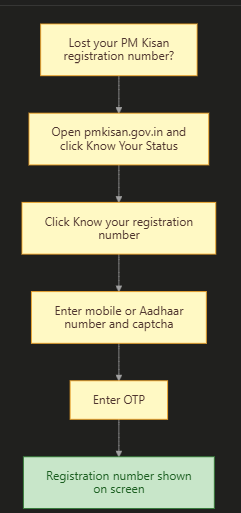
Your registration number is needed for status check and for all PM Kisan services. If you have lost it, follow these steps:
- Open the PM Kisan portal and click on “Know Your Status” in Farmers Corner.
- Click on the link “Know your registration number”.
- Enter your registered mobile number or Aadhaar number.
- Type the captcha and click “Get Mobile OTP”.
- Enter the OTP.
- Your registration number and name will be shown on the screen. Write it down safely.
PM Kisan Registration Date: Is There a Last Date?
- There is no last date for PM Kisan registration. It is open all year.
- But the sooner you register, the sooner you can start getting installments after approval.
- Installments are paid in three periods: April to July, August to November and December to March. If your registration is approved during a period, you can get the installment for that period once all checks are complete.
| Point | Details |
|---|---|
| Registration open | All year |
| Last date | None announced |
| When benefit starts | After state approval, from the installment period in which you are approved |
After Registration: Must-Do Steps
| Step | Why | How |
|---|---|---|
| Complete e-KYC | Compulsory for installments | OTP on portal, face authentication on PM-KISAN app, or fingerprint at CSC |
| Check land seeding | Unverified land stops payment | Know Your Status; contact patwari if “No” |
| Check Aadhaar-bank seeding | Needed for DBT | Know Your Status; visit bank if “No” |
| Keep mobile number active | For OTP and updates | Update it on the portal if changed |
Common Mistakes That Lead to Rejection
| Mistake | What happens | How to avoid it |
|---|---|---|
| Name mismatch in Aadhaar, bank and land records | Form rejected or payment fails | Correct records before applying |
| Land not in your name | Rejected | Get mutation (transfer) done first |
| Wrong Khasra / Khata number | Land verification fails | Copy numbers carefully from your land record |
| Two members of the same family registering | One registration is cancelled | Only one family member should apply |
| Bank account not linked with Aadhaar | Installment fails | Get Aadhaar seeding done at your bank |
| No Farmer ID (in states where needed) | Registration not accepted | Get Farmer ID first |
| Wrong category (for example, income tax payer applying) | Benefit stopped and may be recovered | Apply only if you are eligible |
PM Kisan Helpline
| Purpose | Contact |
|---|---|
| PM Kisan helpline | 155261 / 011-24300606 |
| Toll-free number | 1800-115-526 |
| pmkisan-ict@gov.in | |
| AI chatbot | Kisan e-Mitra on the PM Kisan portal |
| Local help | CSC, patwari / lekhpal, block or district agriculture office |
Frequently Asked Questions (FAQ)
What documents are required for PM Kisan Samman Nidhi registration?
You need your Aadhaar card, Aadhaar-linked mobile number, bank account details (Aadhaar-seeded), land records, ration card number, and, in many states, a Farmer ID. A scanned PDF of your land record is needed for online registration.
How can I do PM Kisan registration online?
Go to pmkisan.gov.in, click “New Farmer Registration” in Farmers Corner, choose rural or urban, enter Aadhaar, mobile and state, verify OTP, fill personal, bank and land details, upload your land record and submit.
Is there any fee for PM Kisan registration?
No. Registration on the official portal and through the agriculture office is free. A CSC may charge a small service fee for helping you.
How do I check my PM Kisan registration status?
Open pmkisan.gov.in, click “Status of Self Registered Farmer / CSC Farmers”, enter your Aadhaar number and captcha, and click Search.
How can I find my PM Kisan registration number?
Click “Know Your Status” and then “Know your registration number”. Enter your mobile or Aadhaar number, the captcha and the OTP. Your registration number will be shown.
PM Kisan registration kaise kare?
You can register yourself on pmkisan.gov.in using “New Farmer Registration”, or visit a CSC or your patwari / agriculture office. Keep Aadhaar, mobile, bank passbook, land records and ration card ready.
Is Farmer ID compulsory for PM Kisan registration?
Farmer ID is compulsory for new registrations in many states. It was made mandatory in 10 states from 1 January 2025 and in 14 states by August 2025. Check with your state agriculture office.
What is the last date for PM Kisan registration?
There is no last date. Registration is open all year. But it is better to register early so that you can start getting installments sooner.
Can I register if the land is in my father’s name?
No. The land must be in your own name. Once the land is transferred to your name (mutation), you can register.
Can both husband and wife get PM Kisan?
No. Only one member of a farmer family (husband, wife and minor children) can get the benefit.
How long does approval take?
It depends on how fast your state checks your land records. It can take a few weeks. Check your status regularly and contact your agriculture office if it is pending for long.
Can tenant farmers register?
Generally, no. The scheme is for farmers who own cultivable land in their own name. Tenant farmers without land in their name are not covered.
Do I need to do e-KYC after registration?
Yes. e-KYC is compulsory to get installments. You can do it by OTP on the portal, by face authentication on the PM-KISAN app, or by fingerprint at a CSC.
What is the PM Kisan helpline number?
You can call 155261 or 011-24300606, or the toll-free number 1800-115-526, or email pmkisan-ict@gov.in.
Sources We Used
- Official portal pmkisan.gov.in: Farmers Corner services, e-KYC and verification notices
- PM-KISAN self-registration user guide (Version 7): registration steps, ration card and land details
- GK Today: Farmer ID mandatory for new registrations in 10 states from 1 January 2025
- News on AIR (5 August 2025): Farmer ID mandatory in 14 states for new registrations
- PIB: 23rd installment release (20 June 2026) and eligibility rules
- Housing.com: PM Kisan helpline numbers
Important Links
| What You Need | Link |
|---|---|
| Application Form (New Farmer Registration) | Click Here |
| Official Site (PM Kisan Portal) | Click Here |
| Registration Status (Self Registered Farmer) | Click Here |
| Know Your Registration Number | Click Here |
| Find Nearest CSC | Click Here |
| PM Kisan 24th Installment Date | Click Here |
| Other Yojana Info | Click Here |
| Home Page | Click Here |