A ration card is one of the most important documents for a family in India. It gives you free or cheap food grains under the National Food Security Act (NFSA), and it is also used as proof of identity and address for many government schemes.
In this guide, you will learn in very simple words how to do ration card apply online, how to check your ration card status, how to add a name (rasan card me name kaise jode), remove a name (naam kaise hataye), correct details, check your name in the list, and how to do ration card download. We also cover the process for Uttar Pradesh, Uttarakhand and Bihar.
Written by: Prabhash, content creator and web developer, yojanabot.com Last updated: 7 October 2026 Fact-checked with: the National Food Security portal (nfsa.gov.in), state food department portals (UP, Uttarakhand, Bihar), Department of Food and Public Distribution instructions, and news reports from 2025 and 2026
| Point | Details |
|---|---|
| Who issues it | Your state government’s Food and Civil Supplies Department |
| Main law | National Food Security Act (NFSA), 2013 |
| Main card types | Antyodaya Anna Yojana (AAY), Priority Household (PHH), and state cards |
| Free grains | Free food grains under PMGKAY (35 kg per AAY family; 5 kg per person for PHH) |
| How to apply | State food department portal, CSC (Jan Seva Kendra), or supply office |
| e-KYC | Needed for every member, through ration shop, Mera Ration app or CSC |
| Download | State portal or DigiLocker |
| National helpline | 1967 (state food helplines) / 14445 (One Nation One Ration Card) |
| National portal | Click Here |
What Is a Ration Card?
A ration card is a document issued by your state government. It lists all the members of your family and shows which category you belong to. With this card, your family can buy food grains from a fair price shop (ration shop).
Since January 2023, food grains for NFSA cardholders are free under the Pradhan Mantri Garib Kalyan Anna Yojana (PMGKAY), and this has been extended for five years from January 2024.
Types of Ration Card
| Card type | Who gets it | Monthly grains |
|---|---|---|
| Antyodaya Anna Yojana (AAY) | The poorest families | 35 kg per family, free |
| Priority Household (PHH) | Poor families selected under NFSA | 5 kg per person, free |
| State cards (for example, State Food Scheme in Uttarakhand) | Families covered by state’s own scheme | As per state rules |
| Non-priority / APL (in some states) | Families above the poverty line | Mostly used as ID; grains as per state rules |
One Nation One Ration Card (ONORC)
With One Nation One Ration Card, you can take your ration from any ration shop in India using your Aadhaar-linked ration card. This helps migrant workers who move to other states for work.
Who Can Apply for a Ration Card?
Eligibility Checklist
- You must be an Indian citizen and a resident of the state where you apply.
- The head of the family should usually be 18 years or older (many states make the eldest woman the head of family under NFSA).
- Your family should not already have a ration card in any state.
- For AAY / PHH cards, your family must meet the income and other rules set by your state.
- Income tax payers, government employees and well-off families are usually not eligible for NFSA cards.
Documents Required for Ration Card Apply
| Document | Why it is needed |
|---|---|
| Aadhaar card of all family members | Identity and e-KYC (mandatory) |
| Address proof (electricity bill, voter ID, rent agreement) | Proof that you live in the state |
| Income certificate | For AAY / PHH categories |
| Family photo (head of family) | For the card |
| Bank passbook | Some states need it for DBT benefits |
| Mobile number | For OTP and updates |
| Old ration card surrender certificate (if any) | If you had a card in another state |
| Caste / disability certificate (if any) | If your state gives priority |
Ration Card Apply Online: Step-by-Step
Each state has its own portal, but the steps are almost the same everywhere.
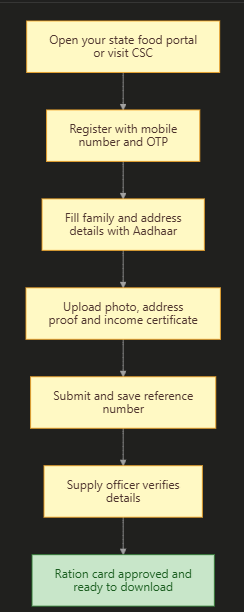
General Steps to Apply Online
- Open your state’s food and civil supplies portal (links for UP, Uttarakhand and Bihar are given below). You can also find all state portals on the NFSA website. To open it, Click Here.
- Look for “Apply for New Ration Card” or “Online Application”.
- Register with your mobile number and verify the OTP.
- Fill in the head of family details, family members’ details and address.
- Enter Aadhaar numbers of all members.
- Upload documents (photo, address proof, income certificate).
- Submit and save the application / reference number.
- A food department officer (or supply inspector) will verify your details.
- After approval, you can download your ration card or collect it from the office.
Ration Card Apply Process
Ration Card Apply Online Uttar Pradesh
| Point | Details |
|---|---|
| Portal | fcs.up.gov.in (Food and Civil Supplies, UP) |
| How to apply | Through a CSC / Jan Seva Kendra, which submits your form on the e-District portal |
| Status check | “Ration Card Application Status” on fcs.up.gov.in, using your reference number |
| Download | “Search in Ration Card Eligibility List” on fcs.up.gov.in, or DigiLocker |
Steps for UP
- Visit your nearest CSC / Jan Seva Kendra with Aadhaar of all members, address proof, income certificate and a family photo.
- The operator fills your form on the e-District / food department portal.
- Take the reference ID printout.
- Track the status on the UP food portal. To open it, Click Here.
Ration Card Apply Uttarakhand (Online and Form PDF)
| Point | Details |
|---|---|
| Department | Food, Civil Supplies and Consumer Affairs, Uttarakhand |
| Card types | AAY, PHH and State Food Scheme (SFY) |
| How to apply | Mainly offline: District Supply Office (towns) or Block office (villages) |
| Form | Ration card application form from the supply office or the department website |
| Status check | “Know Your Ration Card” on the state ration card system |
| Download | DigiLocker (Food and Civil Supplies Department, Uttarakhand) |
| Helpline | 1800-180-2000 / 1800-180-4188 |
Steps for Uttarakhand
- Get the ration card application form from your District Supply Office (urban) or Block office (rural), or download it from the Uttarakhand food department website. To open the website, Click Here.
- Fill the form and attach photos, Aadhaar, address proof and income details.
- Submit it at the supply office and take the receipt.
- After verification, you will get your card. You can later download it from DigiLocker.
Ration Card Apply Online Bihar
| Point | Details |
|---|---|
| Online portal | rconline.bihar.gov.in |
| Login | “Meri Pehchan” sign-up with OTP |
| Documents | Aadhaar, bank passbook, residence certificate, family photo, signature |
| Status | Reference number sent by SMS |
| Old system | Also available through RTPS counters |
Steps for Bihar
- Open the Bihar online ration card portal. To open it directly, Click Here.
- Sign up as a new user using Meri Pehchan and verify the OTP.
- Fill in the family details and upload documents.
- Submit and save the reference number sent by SMS.
- Track your application with this number.
Rasan Card Me Name Kaise Jode (How to Add a Name to a Ration Card)
You may need to add a name after a birth in the family or after a marriage.
Documents for Adding a Name
| Reason | Documents needed |
|---|---|
| Newborn child | Birth certificate, child’s Aadhaar (if available), parents’ ration card |
| Daughter-in-law after marriage | Marriage certificate, her Aadhaar, name removed from her parents’ ration card |
| Any other member | Aadhaar and proof of relationship |
Steps to Add a Name Online
- Open the Mera Ration app or your state food portal.
- Log in with your ration card number and registered mobile number (OTP).
- Choose “Add Member” or “Member Addition”.
- Enter the new member’s name, date of birth, relation and Aadhaar number.
- Upload the birth certificate or marriage certificate.
- Submit and save the acknowledgement number.
- The food department checks and approves it. This usually takes about 15 to 30 days, depending on your district.
If online addition is not available in your state, visit your supply office or CSC with the documents.
Rasan Card Se Naam Kaise Hataye (How to Remove a Name)
A name is removed when a member dies, gets married and moves, or moves to another state.
| Reason | Document needed |
|---|---|
| Death | Death certificate |
| Marriage (daughter moving to her husband’s family) | Marriage certificate |
| Shifting to another place | Request letter and new address proof |
Steps to Remove a Name
- Log in to your state food portal or visit the supply office / CSC.
- Choose “Member Deletion” or “Remove Member”.
- Select the member and the reason.
- Upload the death certificate, marriage certificate or other proof.
- Submit and save the reference number.
Rasan Card Me Name Kaise Check Kare (How to Check Your Name)
Method 1: NFSA Portal (All States)
- Open the NFSA website. To open it, Click Here.
- Go to “Ration Cards” and click on “Ration Card Details on State Portals”.
- Choose your state, then your district, block / town, and ration shop.
- The list of ration cards will open. Click on your card number to see all members’ names.
Method 2: Mera Ration App
- Download the Mera Ration app from the Play Store.
- Log in with your ration card number or Aadhaar and OTP.
- See your family members and monthly entitlement.
Ration Card Correction
You can correct mistakes like a wrong name spelling, date of birth, address or head of family.
- Log in to your state food portal (or visit CSC / supply office).
- Choose “Correction”, “Modify Ration Card” or “Update Details”.
- Make the change and upload proof (for example, Aadhaar for name or date of birth, a new bill for address).
- Submit and track the status with your reference number.
Ration Card Status Check
| Way | Steps |
|---|---|
| State food portal | Open “Application Status”, enter your reference / application number, and verify with OTP if asked |
| SMS | Many states send status updates to your registered mobile |
| Supply office / CSC | Ask with your reference number |
| Mera Ration app | See card details and whether your members are active |
Ration Card Download
Method 1: State Portal
- Open your state food portal (for example, fcs.up.gov.in in UP).
- Choose the option to search or download your ration card.
- Enter your ration card number and captcha, then verify the OTP.
- Click on Download to save the PDF.
Method 2: DigiLocker
- Open DigiLocker. To open it, Click Here.
- Log in with your Aadhaar-linked mobile.
- Search for “Ration Card” and choose your state’s food department.
- Enter your ration card number and fetch the document.
- Your ration card will be saved in your DigiLocker, and you can download it.
Ration Card e-KYC: Why It Matters
Every member listed on the card needs to complete e-KYC (Aadhaar-based identity check).
| Way to do e-KYC | What you need |
|---|---|
| At the ration shop (ePoS machine) | Fingerprint of each member |
| Mera Ration app with Aadhaar FaceRD app | Face scan using your phone (where your state allows it) |
| CSC or state camps | Aadhaar and ration card |
Important to know: As per the Department of Food and Public Distribution, no genuine beneficiary should be removed or denied grains just because of technical problems in authentication. There is no national last date, but some states run their own campaigns, so finish your e-KYC early.
Common Mistakes and How to Avoid Them
| Mistake | What happens | How to fix it |
|---|---|---|
| Name already on another ration card | New card or addition rejected | Remove the name from the old card first |
| e-KYC not done | Member may be marked for checking | Complete e-KYC at the ration shop, app or CSC |
| Wrong Aadhaar number | Verification fails | Check Aadhaar numbers carefully |
| Paying agents | Fraud risk | Use official portals or CSC; there is no extra fee for the card |
| Mobile number not linked | No OTP | Update your mobile number at the supply office |
Ration Card Helpline
| Purpose | Contact |
|---|---|
| State food helpline (most states) | 1967 |
| One Nation One Ration Card helpline | 14445 |
| Uttarakhand food helpline | 1800-180-2000 / 1800-180-4188 |
| Local help | Supply office, block office or CSC |
Frequently Asked Questions (FAQ)
How can I apply for a ration card online?
Open your state’s food and civil supplies portal, register with your mobile number, fill in family details with Aadhaar, upload documents and submit. You can also apply through a CSC or the supply office.
Rasan card me name kaise jode?
Log in to the Mera Ration app or your state food portal with your ration card number and OTP, choose “Add Member”, enter the new member’s details and Aadhaar, upload the birth or marriage certificate, and submit.
Rasan card se naam kaise hataye?
Choose “Member Deletion” on your state food portal or visit the supply office, select the member and reason, upload the death or marriage certificate, and submit.
Rasan card me name kaise check kare?
Go to nfsa.gov.in, open “Ration Card Details on State Portals”, choose your state, district, block and ration shop, and open your card number. You can also use the Mera Ration app.
How can I do ration card download?
Use your state food portal (enter card number, captcha and OTP) or DigiLocker (search “Ration Card” and choose your state’s food department).
How can I check my ration card application status?
Open your state food portal, click on “Application Status”, enter your reference number and verify with OTP if asked. You can also ask at the supply office or CSC.
How can I apply for a ration card in Uttarakhand?
In Uttarakhand, you mainly apply offline at the District Supply Office (towns) or Block office (villages) with the application form, photos, Aadhaar and address proof. You can later download the card from DigiLocker.
Is there a ration card form PDF for Uttarakhand?
Yes. The application form is available at the supply office and on the Uttarakhand food department website. Fill it, attach documents and submit it at the office.
How can I apply for a ration card online in Uttar Pradesh?
In UP, visit a CSC / Jan Seva Kendra, which submits your form online on the e-District / food portal. You can then track it on fcs.up.gov.in.
How can I apply for a ration card online in Bihar?
Open rconline.bihar.gov.in, sign up with Meri Pehchan, fill in family details, upload documents and submit. Save the reference number sent by SMS.
How long does it take to add a name?
It usually takes about 15 to 30 days, depending on your district’s food department.
Is ration free in 2026?
Yes. NFSA cardholders get free food grains under PMGKAY: 35 kg per AAY family and 5 kg per person for PHH families each month.
Is e-KYC compulsory for ration card?
Yes, e-KYC is needed for every member. There is no national last date, but complete it early at the ration shop, through the Mera Ration app or at a CSC.
What is the ration card helpline number?
Most states use 1967 as the food helpline. For One Nation One Ration Card, call 14445.
Sources We Used
- National Food Security portal (nfsa.gov.in): state portal links and ration card details
- Tribune India: UP ration card application, status and download process
- Patna Press: Bihar online ration card service on rconline.bihar.gov.in (July 2025)
- ClearTax: Uttarakhand ration card types, process and helplines
- DK Seva: adding members through Mera Ration app (May 2026)
- Indian Pay Calculator: no national e-KYC deadline and NFSA protections (2026)
- Patrika: ration card e-KYC using phone (November 2025)
Important Links
These important links are collected for you by yojanabot.com. Click on any link to open the page.
| What You Need | Link |
|---|---|
| Application Form (find your state portal on NFSA) | Click Here |
| Official Site (National Food Security Portal) | Click Here |
| UP Ration Card (Apply, Status, Download) | Click Here |
| Uttarakhand Food Department | Click Here |
| Bihar Ration Card Apply Online | Click Here |
| Ration Card Download (DigiLocker) | Click Here |
| Ayushman Card Apply and Download | Click Here |
| Other Yojana Info | Click Here |
| Home Page | Click Here |