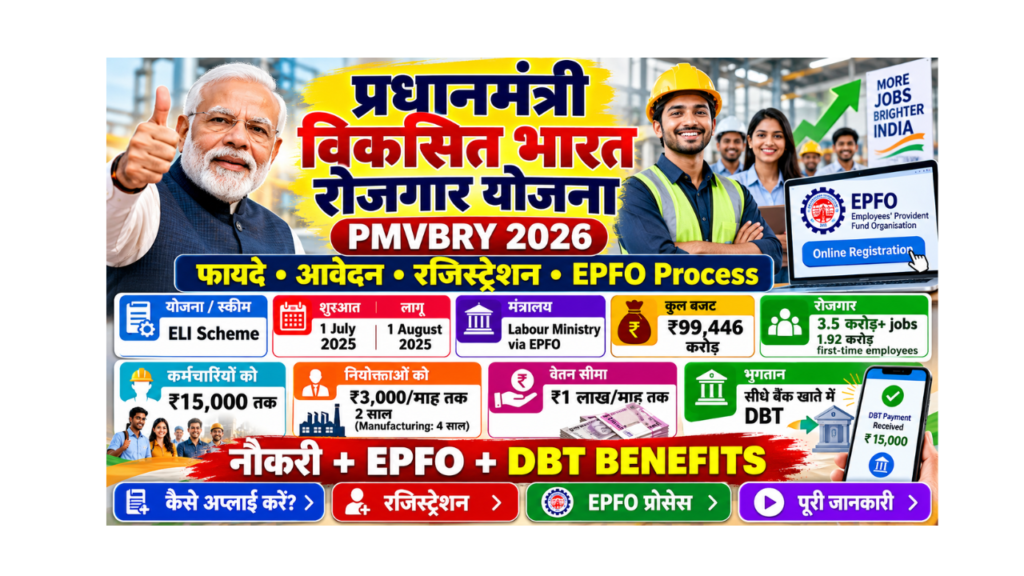
Getting your first proper job is a big moment. To celebrate and support this step, the central government started the Pradhan Mantri Viksit Bharat Rozgar Yojana (PMVBRY). Under this scheme, first-time employees get up to ₹15,000, and employers get up to ₹3,000 per month for every new employee they hire.
In this guide, you will learn in very simple words what PMVBRY is, its benefits, who is eligible, how to apply, how registration works for employees and employers, how the EPFO process works, and which is the official website.
| Point | Details |
|---|---|
| Scheme name | Pradhan Mantri Viksit Bharat Rozgar Yojana (PMVBRY / PM-VBRY) |
| Earlier name | Employment Linked Incentive (ELI) Scheme |
| Approved by Cabinet | 1 July 2025 |
| Started on | 1 August 2025 |
| Run by | Ministry of Labour and Employment, through EPFO |
| Total budget | ₹99,446 crore |
| Target | More than 3.5 crore jobs, including about 1.92 crore first-time employees |
| Jobs covered | Jobs created from 1 August 2025 to 31 July 2027 |
| Benefit for employees | Up to ₹15,000 (one month’s EPF wage) in two instalments |
| Benefit for employers | Up to ₹3,000 per month per new employee, for 2 years (4 years in manufacturing) |
| Salary limit | Up to ₹1 lakh per month |
| Payment | Directly to bank account (Aadhaar-based DBT for employees, PAN-linked account for employers) |
| EPFO helpline | 14470 / 1800-118-005 |
| Official website | Click Here |
What Is Pradhan Mantri Viksit Bharat Rozgar Yojana?
PMVBRY is a central government scheme to create more jobs in the formal sector. A formal job means a job where your employer registers you with EPFO (Employees’ Provident Fund Organisation), and you get benefits like PF (Provident Fund).
The scheme has two parts:
- Part A helps first-time employees by giving them up to ₹15,000.
- Part B helps employers by giving them up to ₹3,000 per month for each extra employee they hire.
The scheme was approved as the Employment Linked Incentive (ELI) Scheme and was started as the Pradhan Mantri Viksit Bharat Rozgar Yojana on 1 August 2025.
Part A vs Part B: Simple Comparison
| Point | Part A (for employees) | Part B (for employers) |
|---|---|---|
| Who gets the money | First-time employees | Employers registered with EPFO |
| How much | Up to ₹15,000 in total | Up to ₹3,000 per month per new employee |
| How long | Two instalments (after 6 and 12 months) | 2 years (4 years for manufacturing) |
| Salary limit | Up to ₹1 lakh per month | Employees with salary up to ₹1 lakh per month |
| Paid into | Employee’s Aadhaar-linked bank account | Employer’s PAN-linked bank account |
PMVBRY Progress So Far
When the Prime Minister released incentives on 19 June 2026, the government shared these figures:
| Item | Number |
|---|---|
| Money released on 19 June 2026 | About ₹2,400 crore |
| First-time employees brought under EPFO | About 70 lakh |
| Young people who completed 6 months in their first job | Close to 20 lakh |
| Beneficiaries who got the incentive after 6 months | About 10 lakh |
Benefits of PMVBRY for First-Time Employees (Part A)
If this is your first job with EPF, you can get one month’s EPF wage, up to ₹15,000, as a reward from the government.
How the ₹15,000 Is Paid
| Instalment | When you get it | Amount |
|---|---|---|
| First instalment | After 6 months of continuous service | Up to ₹7,500 |
| Second instalment | After 12 months of service and finishing a financial literacy programme | The remaining amount |
- A part of the money is kept in a savings or deposit account for a fixed time, to help you build a saving habit. You can take it out later.
- The money comes directly to your Aadhaar-linked bank account through the Aadhaar Bridge Payment System (ABPS).
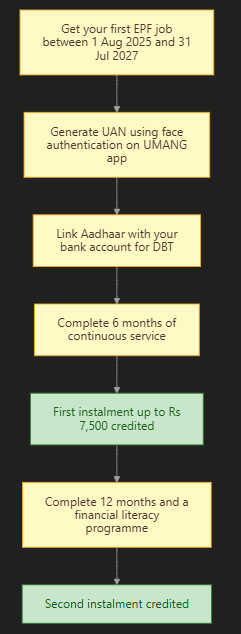
First-Time Employee Journey
Benefits of PMVBRY for Employers (Part B)
Employers get money every month for each extra (additional) employee they hire and keep for at least 6 months.
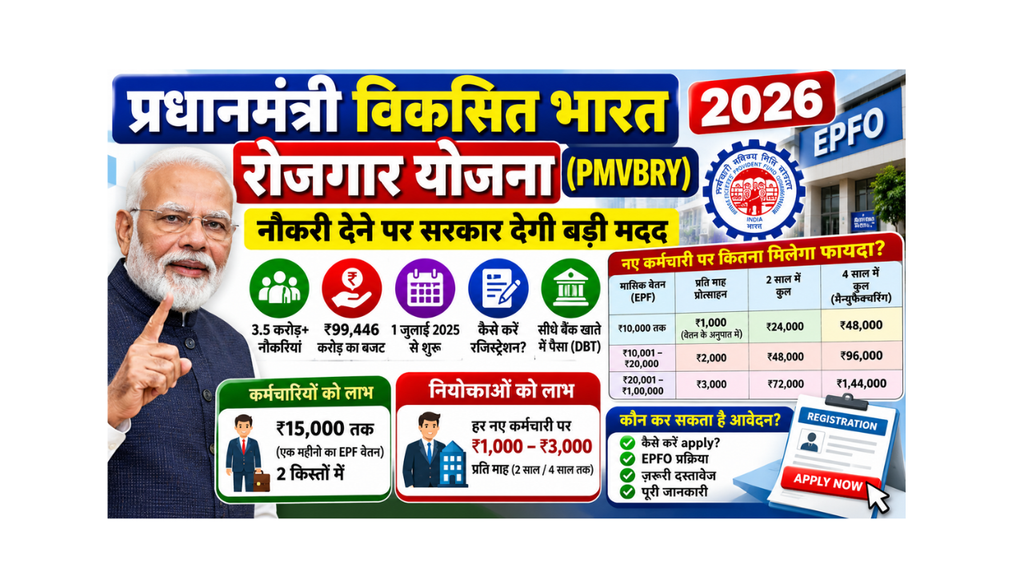
Employer Incentive by Salary of the New Employee
| Monthly salary (EPF wage) of new employee | Incentive per month per employee | Total in 2 years | Total in 4 years (manufacturing) |
|---|---|---|---|
| Up to ₹10,000 | Up to ₹1,000 (in proportion to salary) | Up to ₹24,000 | Up to ₹48,000 |
| ₹10,001 to ₹20,000 | ₹2,000 | ₹48,000 | ₹96,000 |
| ₹20,001 to ₹1,00,000 | ₹3,000 | ₹72,000 | ₹1,44,000 |
What does this chart show? The higher the salary of the new employee (up to ₹1 lakh), the bigger the monthly incentive for the employer. Manufacturing companies get this support for 4 years instead of 2.
Minimum New Hiring Rule for Employers
| Size of the establishment | Minimum extra employees to hire |
|---|---|
| Less than 50 employees | At least 2 extra employees |
| 50 or more employees | At least 5 extra employees |
The new employees must stay in the job for at least 6 months.
PMVBRY Eligibility
Eligibility for Employees (Part A)
- You must be a first-time employee, meaning you were never an EPFO member before 1 August 2025.
- You must join a job registered with EPFO between 1 August 2025 and 31 July 2027.
- Your monthly salary (gross) should be up to ₹1 lakh.
- Your UAN (Universal Account Number) must be generated and activated using Aadhaar Face Authentication on the UMANG app.
- Your bank account must be linked with Aadhaar for DBT.
- You must complete at least 6 months of continuous service for the first instalment.
Eligibility for Employers (Part B)
- The establishment must be registered with EPFO.
- It must hire the minimum number of extra employees (2 or 5, as shown above).
- New employees must have a salary of up to ₹1 lakh per month.
- New employees must be kept for at least 6 months.
- The employer must file monthly ECR (Electronic Challan-cum-Return) on time.
Documents Required for PMVBRY
For Employees
| Document | Why it is needed |
|---|---|
| Aadhaar card | For UAN generation and face authentication |
| Mobile number linked with Aadhaar | For OTP |
| Bank account linked with Aadhaar | To receive the incentive through DBT |
| Smartphone with UMANG and AadhaarFaceRD apps | For face authentication |
| Offer letter or joining details | Your employer uses these to register you with EPFO |
For Employers
| Document | Why it is needed |
|---|---|
| EPFO establishment code and login | To register on the PMVBRY portal |
| PAN of the establishment | For identity and payment |
| GSTIN or TAN | For verification |
| PAN-linked bank account details | To receive the incentive |
How to Apply for Pradhan Mantri Viksit Bharat Rozgar Yojana
There is no separate application form for employees. You become a beneficiary through EPFO, when your employer registers you and files your PF details. But you must complete a few steps yourself.
How to Apply as an Employee (Part A)
- Join a job where your employer registers you with EPFO (PF).
- Download the UMANG app and the AadhaarFaceRD app on your smartphone. To open the UMANG website, Click Here.
- In UMANG, go to the EPFO services and choose UAN allotment and activation using Face Authentication.
- Enter your Aadhaar number and mobile number, verify the OTP, and scan your face.
- Your UAN will be generated and activated. You will get it by SMS.
- Give your UAN to your employer, if they ask for it.
- Make sure your bank account is linked with Aadhaar (ask your bank to enable it for DBT).
- Work for 6 months. The first instalment will be paid directly to your bank.
- Complete the financial literacy programme and 12 months of service to get the second instalment.
PMVBRY Registration for Employers (Part B)
- Open the official PMVBRY portal. To open it directly, Click Here.
- Log in using your EPFO establishment credentials.
- Complete the one-time registration with PAN, GSTIN / TAN and PAN-linked bank account details.
- Make sure all new employees hired from 1 August 2025 have UANs made through face authentication.
- File your monthly ECR on time with correct salary details.
- The incentive is credited to your PAN-linked bank account for every eligible extra employee.
PMVBRY EPFO Process Explained Simply
EPFO is the backbone of this scheme. Here is how it works:
| Step | Who does it | What happens |
|---|---|---|
| 1 | Employee | Generates UAN with Aadhaar face authentication on UMANG |
| 2 | Employer | Registers on the PMVBRY portal and adds the employee to EPF |
| 3 | Employer | Files monthly ECR (PF return) with the employee’s salary |
| 4 | EPFO | Checks eligibility (first-time employee, salary, months of service) |
| 5 | EPFO | Sends money to the employee’s Aadhaar-linked bank account (Part A) |
| 6 | EPFO | Sends money to the employer’s PAN-linked account (Part B) |
How to Check PMVBRY Status
For Employees
- Log in to the EPFO member portal or the UMANG app with your UAN to check your PF passbook and service details.
- Check your bank account SMS or passbook for the incentive credit.
- If you have not received it after 6 months, ask your employer whether your ECR has been filed, and call the EPFO helpline 14470.
For Employers
- Log in to the PMVBRY portal with your EPFO establishment credentials.
- Check the status of registered employees and the incentive payments.
PMVBRY Official Website
| Website | What it is for |
|---|---|
| pmvbry.epfindia.gov.in | Main PMVBRY portal run by EPFO (employer registration and login) |
| pmvbry.labour.gov.in | PMVBRY page of the Ministry of Labour and Employment |
| epfindia.gov.in | EPFO main website |
| web.umang.gov.in | UMANG, for UAN generation with face authentication |
Be careful: Some websites with names like “PM-VBRY” are not official. Use only websites ending with .gov.in.
Common Mistakes and How to Avoid Them
| Mistake | What happens | How to fix it |
|---|---|---|
| UAN not made with face authentication | Not counted for the scheme | Generate or activate UAN with face authentication on UMANG |
| Bank account not linked with Aadhaar | Money cannot be sent | Ask your bank to link Aadhaar and enable DBT |
| Leaving the job before 6 months | No first instalment | Try to complete 6 months of continuous service |
| Already had a PF account before August 2025 | Not a first-time employee | Part A is only for first-time EPFO members |
| Employer did not register on the portal | Employer does not get Part B | Employer should complete one-time registration |
| ECR not filed on time | Payment delayed | Employer should file ECR every month |
| Paying an agent to “apply” | Fraud risk | There is no fee; the process is through EPFO |
Helpline and Contact Details
| Purpose | Contact |
|---|---|
| EPFO helpline (short code) | 14470 |
| EPFO toll-free number | 1800-118-005 |
| PMVBRY portal | pmvbry.epfindia.gov.in |
| Ministry of Labour PMVBRY page | pmvbry.labour.gov.in |
| Grievances | EPFiGMS portal on epfindia.gov.in, or your nearest EPFO office |
Frequently Asked Questions (FAQ)
What is Pradhan Mantri Viksit Bharat Rozgar Yojana (PMVBRY)?
It is a central government scheme that started on 1 August 2025. It gives up to ₹15,000 to first-time employees and up to ₹3,000 per month to employers for every new employee, to create more than 3.5 crore jobs.
What are the benefits of PMVBRY?
First-time employees get one month’s EPF wage, up to ₹15,000, in two instalments. Employers get ₹1,000 to ₹3,000 per month for each new employee for 2 years, or 4 years in the manufacturing sector.
How to apply for Pradhan Mantri Viksit Bharat Rozgar Yojana?
Employees do not fill a separate form. Join an EPF-registered job, generate your UAN with face authentication on the UMANG app, link Aadhaar with your bank account, and complete 6 months. Employers register once on pmvbry.epfindia.gov.in.
Who is eligible for PMVBRY?
Employees who became EPFO members for the first time between 1 August 2025 and 31 July 2027, with a salary of up to ₹1 lakh per month, are eligible. Employers registered with EPFO who hire at least 2 (or 5) extra employees are eligible for Part B.
What is the official website of PMVBRY?
The official website is pmvbry.epfindia.gov.in, run by EPFO. The Ministry of Labour also has a page at pmvbry.labour.gov.in.
Is there any registration for employees?
There is no separate registration form for employees. Your employer registers you with EPFO. You only need to generate your UAN using Aadhaar face authentication on the UMANG app and link Aadhaar with your bank account.
How does EPFO pay the money?
EPFO pays the employee’s incentive through Aadhaar-based DBT (ABPS) to the bank account linked with Aadhaar. Employer incentives are paid to the employer’s PAN-linked bank account.
When will I get the first instalment?
You get the first instalment of up to ₹7,500 after completing 6 months of continuous service in your job.
When will I get the second instalment?
You get the second instalment after completing 12 months of service and a financial literacy programme.
I had a PF account in an earlier job. Can I get Part A benefit?
No. Part A is only for people who were never EPFO members before 1 August 2025. Your new employer may still get the Part B benefit if other rules are met.
Can people with a salary above ₹1 lakh get this benefit?
No. The scheme covers employees with a monthly salary of up to ₹1 lakh.
Can manufacturing companies get extra benefit?
Yes. Employers in the manufacturing sector get the incentive for 4 years instead of 2 years.
What is the last date of PMVBRY?
The scheme covers jobs created from 1 August 2025 to 31 July 2027. Jobs created after 31 July 2027 are not covered.
Is PMVBRY available in Hindi and English?
Yes. Information on government websites is usually available in both Hindi and English, and EPFO helpline staff can help in Hindi and other languages.
What is the helpline number for PMVBRY?
You can call the EPFO helpline 14470 or the toll-free number 1800-118-005 for help with UAN, PF and PMVBRY questions.
Sources We Used
- PMO / PIB: Union Cabinet approves Employment Linked Incentive (ELI) Scheme (1 July 2025)
- News on AIR: One-time online registration for PMVBRY opens, with official portal addresses (18 August 2025)
- PIB and PMO: Prime Minister disburses about ₹2,400 crore under PM-VBRY (19 June 2026)
- EPFO / Ministry of Labour: UAN generation through Aadhaar face authentication on UMANG (April 2025)
- C-DOT notice on EPFO helpline short code 14470
Important Links
| What You Need | Link |
|---|---|
| Application Form (Employer Registration on PMVBRY Portal) | Click Here |
| Official Site (PMVBRY, EPFO) | Click Here |
| Ministry of Labour PMVBRY Page | Click Here |
| UAN Generation with Face Authentication (UMANG) | Click Here |
| EPFO Official Website | Click Here |
| PM Vishwakarma Yojana Online Apply | Click Here |
| Other Yojana Info | Click Here |
| Home Page | Click Here |