The Pradhan Mantri Awas Yojana has entered a new phase, commonly called PM Awas Yojana 2.0. If you are trying to apply online, download the application form PDF, or simply check where your application stands, this guide walks you through every step in very simple English.
This article covers both the urban scheme (PMAY-U 2.0) and gives you a clear path for rural status checks (PMAY-G), since many people search for both under the same “PM Awas Yojana” name.
What is PM Awas Yojana 2.0?
PM Awas Yojana 2.0 is the updated phase of the Pradhan Mantri Awas Yojana, aimed at giving more eligible families access to affordable housing support, home loan interest subsidy, and construction assistance. It builds on the original scheme, with a refreshed application and assessment process managed centrally.
In simple words
- You apply online through the official portal.
- Your eligibility and documents are assessed.
- Once approved, you receive financial assistance or a home loan interest subsidy, depending on the scheme component you qualify for.
- You can track your application at every stage, right from your phone or computer.
Urban vs Rural: Which PMAY Are You Looking For?
This is one of the most common points of confusion. “PM Awas Yojana” actually covers two separate schemes with two separate portals.
| Feature | PMAY-Urban 2.0 (PMAY-U 2.0) | PMAY-Gramin (PMAY-G) |
|---|---|---|
| Who it is for | Families living in towns and cities | Families living in villages |
| Online application | Yes, self-apply online | No separate online form; based on survey data |
| Official portal | pmaymis.gov.in | pmayg.dord.gov.in |
| How status is checked | Application ID or Aadhaar number | Registration number or village-wise search |
| Run by | Ministry of Housing and Urban Affairs | Ministry of Rural Development |
Simple way to remember
- Live in a city or town? You are looking for PMAY-U 2.0, and you can apply online yourself.
- Live in a village? You are looking for PMAY-G, where there is no separate online application form — eligibility comes from the Awaas+ survey, and you simply check your status on the rural portal.
Key Highlights at a Glance
| Point | Details |
|---|---|
| Scheme name | Pradhan Mantri Awas Yojana 2.0 (Urban) |
| Rural counterpart | Pradhan Mantri Awas Yojana – Gramin (PMAY-G) |
| Application mode (Urban) | Fully online, or through Common Service Centres (CSC) |
| Application mode (Rural) | No separate form; based on survey (Awaas+) |
| Official portal (Urban) | pmaymis.gov.in |
| Official portal (Rural) | pmayg.dord.gov.in |
| Status check methods | Application ID, Aadhaar number, or registration number |
| Fee to apply or check status | Nil (free) |
| Aadhaar requirement | Compulsory for application and status tracking |
Important: The PMAY-G Portal Has a New Address
If you are checking rural status, please note that the old PMAY-G website, pmayg.nic.in, is no longer active and simply redirects. The current official address is:
| Purpose | Current Official Address |
|---|---|
| Main PMAY-G portal | pmayg.dord.gov.in |
| Beneficiary search (AwaasSoft) | awaassoft.pmayg.dord.gov.in |
| Village and Gram Panchayat reports | report.pmayg.dord.gov.in |
Please update any saved bookmarks. Always confirm you are on a domain ending in dord.gov.in for rural status checks.
Components Covered Under PMAY-U 2.0
| Component | What It Means in Simple Words |
|---|---|
| Beneficiary-Led Construction (BLC) | Support to build or add a room to your own house on land you already own |
| Affordable Housing in Partnership (AHP) | Support to buy a house built by a developer in partnership with the government |
| Affordable Rental Housing (ARH) | Rental housing support for workers and vulnerable groups in urban areas |
| Interest Subsidy Scheme (ISSR) | Interest support on a home loan for eligible applicants |
The exact component you qualify for depends on your income category, existing land or home ownership, and the city you live in.
Eligibility Criteria for PMAY-U 2.0
Basic conditions
- You must be an Indian citizen.
- Your family should not already own a pucca house anywhere in India.
- You should belong to one of the recognised income categories, such as EWS (Economically Weaker Section), LIG (Low Income Group), or MIG (Middle Income Group), depending on the component.
- A woman should generally be an owner or co-owner of the house, as per scheme guidelines.
- You should have a valid Aadhaar card.
Quick eligibility snapshot
| Category | General Income Range Focus | Likely Component |
|---|---|---|
| EWS | Lower income households | BLC, AHP |
| LIG | Lower-middle income households | AHP, ISSR |
| MIG | Middle income households | ISSR |
Exact income slabs and conditions are defined by the scheme guidelines and can be updated, so please confirm the latest figures on the official portal before applying.
Documents Required
| Document | Purpose |
|---|---|
| Aadhaar card | Identity verification, compulsory for application |
| Income certificate | Confirms your income category |
| Proof of address | Confirms your current residence |
| Bank account details | For subsidy or financial assistance transfer |
| Passport-size photograph | For your application record |
| Property documents, if applicable | For Beneficiary-Led Construction applicants who already own land |
| Mobile number | For OTP verification and status updates |
How to Apply Online for PMAY 2.0 (Step-by-Step)
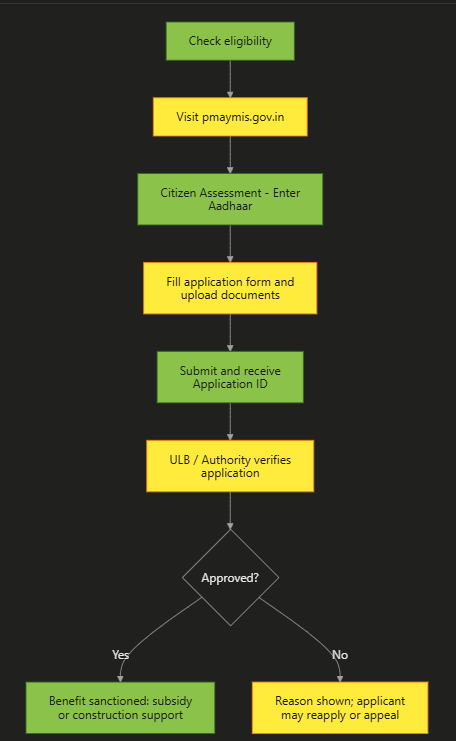
Step 1: Check your eligibility first
Before applying, confirm that you do not already own a pucca house, and that your income falls under one of the eligible categories.
Step 2: Visit the official portal
Go to pmaymis.gov.in, the official PMAY-Urban portal.
Step 3: Open the Citizen Assessment section
Click on “Citizen Assessment” and choose the option that matches your situation, such as “Benefits under other 3 components” or the relevant 2.0 application link shown on the portal.
Step 4: Enter your Aadhaar number
Enter your 12-digit Aadhaar number and your name exactly as per Aadhaar, then proceed for verification.
Step 5: Fill in the application form
Complete the form with your personal details, family details, income details, and current housing status.
Step 6: Upload your documents
Upload scanned copies of your income certificate, address proof, and any property documents, as applicable.
Step 7: Submit and save your Application ID
After submission, you will receive an Application ID. Save this carefully, since you will need it to track your status later.
Alternate method: Apply through a Common Service Centre (CSC)
If you are not comfortable applying online yourself, visit your nearest Common Service Centre (CSC), where an operator can help you complete the same process.
Can You Apply Online for PMAY-Gramin?
This is an important point many people miss: PMAY-Gramin has no separate, self-service online application form like the urban scheme does. Instead, eligibility for rural housing comes from:
- The SECC-2011 database, and
- The Awaas+ survey, conducted by local Gram Panchayat and block officials.
What rural applicants should do instead
- Check whether your household is already listed by visiting your Gram Panchayat office.
- If you believe you were left out, ask about inclusion in the next Awaas+ survey round.
- Once listed, you can check your status online on the official rural portal, as explained in the rural status section below.
How to Check PMAY 2.0 Status Online
Status check using Application ID
- Visit pmaymis.gov.in.
- Go to “Citizen Assessment”, then select “Track Your Assessment Status.”
- Choose the “By Name, Father’s Name and Mobile Number” or “By Assessment ID” option.
- Enter your Application ID and registered mobile number.
- Submit to view your current status.
Status check using Aadhaar number
- On the same status check page, select the Aadhaar-based option.
- Enter your Aadhaar number.
- Complete the OTP verification sent to your Aadhaar-linked mobile number.
- View your application status on screen.
How to Check Status by Application Number
If you specifically have your Application Number or Assessment ID from your acknowledgement receipt, this is usually the fastest method.
- Visit pmaymis.gov.in/Track_Application_Status.aspx, or the equivalent “Track Application” link on the current portal.
- Select “By Assessment ID.”
- Enter your Application Number.
- Click Submit to see your progress immediately.
How to Check Rural (PMAY-G) Status Online
Step-by-step method
- Visit pmayg.dord.gov.in, the current official PMAY-G portal.
- Click on “Stakeholders,” then select “IAY/PMAYG Beneficiary.”
- Enter your registration number, if you have it, and click Submit.
- If you do not know your registration number, use “Advanced Search” and select your state, district, block, and Gram Panchayat, then search by name.
- Your sanction status, installment history, and construction stage will be displayed.
Alternative: Using the UMANG app
You can also download the UMANG app, search for PMAY-G, and check your beneficiary details and installment records using your registration details.
How to Download the PMAY 2.0 Form PDF (English and Hindi)
For urban applicants
- Since PMAY-U 2.0 is a fully online application, a blank form PDF for self-filling is generally not required; you fill the form directly on pmaymis.gov.in.
- If you need a printable guidelines document or sample form for reference (including a Hindi-language version), check the “Guidelines” or “Downloads” section on the official portal, since available documents can be updated from time to time.
For rural applicants
- PMAY-G does not use a self-fill PDF form either, since eligibility comes from the Awaas+ survey, not a submitted application form.
- Official guideline documents, including in Hindi, are usually available under the “Awaassoft” or “Downloads” section on pmayg.dord.gov.in.
Tip if you still need a copy for reference
Keep a screenshot or printout of your submitted online application (urban) or your beneficiary status page (rural), since this can serve the same purpose as a form copy when you need to show proof locally.
Full Application Journey (Visual Flow)
Your Status Messages
| Status Shown | Meaning |
|---|---|
| Application Submitted | Your request has been received by the portal |
| Under Verification | Local authority (ULB) is checking your documents |
| Approved | Your application meets the eligibility criteria |
| Sanctioned | Financial assistance or subsidy has been approved |
| Disbursed | The amount has been credited to your bank account |
| Rejected | Application did not meet requirements; check the reason shown |
Common Problems and Solutions
| Problem | Likely Reason | Solution |
|---|---|---|
| Aadhaar verification failing | Name mismatch between Aadhaar and application | Correct your name as per Aadhaar and retry |
| Application ID not found | Typing error, or using the old PMAY-G address by mistake | Double-check your ID, and confirm you are using the correct portal (urban vs rural) |
| OTP not received | Mobile number not linked to Aadhaar, or network issue | Update your mobile number through proper Aadhaar channels and retry |
| Rural status not showing | Household not yet surveyed under Awaas+ | Visit your Gram Panchayat to confirm survey inclusion |
| Website not loading | High traffic or maintenance | Try again later, or use the UMANG app as an alternative for rural status |
Tips to Avoid Fraud
- Applying and checking status under PM Awas Yojana is completely free.
- No agent or official should ask for money to approve or speed up your application.
- Always use the official portals: pmaymis.gov.in for urban, and pmayg.dord.gov.in for rural.
- Never share your Aadhaar OTP or bank PIN with anyone over phone or message.
- Report suspicious demands for money to your local ULB office, Gram Panchayat, or the police.
Why This Scheme Matters (Our Analysis)
- A real path to homeownership: The scheme directly reduces the cost barrier of owning a pucca house, whether through subsidy, construction support, or rental assistance.
- Faster, trackable process: Unlike older offline systems, PMAY 2.0 lets you track every stage of your application yourself.
- Covers different needs: With multiple components (BLC, AHP, ARH, ISSR), the scheme can support very different housing situations under one umbrella.
Simple action plan
| Step | Action |
|---|---|
| 1 | Confirm your eligibility category (EWS/LIG/MIG) and whether you are urban or rural |
| 2 | Keep Aadhaar, income proof, and bank details ready |
| 3 | Apply online at pmaymis.gov.in (urban) or check Awaas+ survey inclusion (rural) |
| 4 | Save your Application ID or registration number safely |
| 5 | Track your status regularly until sanction and disbursal |
Frequently Asked Questions
Q1. What is PM Awas Yojana 2.0?
It is the updated phase of the Pradhan Mantri Awas Yojana (Urban), offering housing assistance and home loan interest subsidy to eligible families through a streamlined online application and tracking process.
Q2. How do I apply for PM Awas Yojana 2.0 online?
Visit pmaymis.gov.in, click Citizen Assessment, verify using your Aadhaar number, fill in your personal and income details, upload the required documents, and submit to receive your Application ID.
Q3. How can I check my PMAY 2.0 status online?
Go to pmaymis.gov.in, click Citizen Assessment, then Track Your Assessment Status, and check using your Application ID, or your name and mobile number, or your Aadhaar number with OTP verification.
Q4. How do I check status by application number specifically?
Visit the Track Application Status page on pmaymis.gov.in, select the option to search by Assessment ID, enter your Application Number, and submit to view your current status immediately.
Q5. Where can I download the PM Awas Yojana 2.0 form PDF?
Since PMAY-U 2.0 is a fully online application, there is usually no separate blank PDF form to download and submit. You fill the form directly on pmaymis.gov.in. Guideline documents, including Hindi versions, may be available under the Downloads section of the official portal.
Q6. Can I apply for PMAY-Gramin (rural) online the same way?
No. PMAY-Gramin does not have a separate self-fill online application form. Eligibility comes from the SECC-2011 database and the Awaas+ survey conducted locally, so rural applicants should check their status rather than fill a new form.
Q7. How do I check rural (PMAY-G) status online?
Visit pmayg.dord.gov.in, click Stakeholders, then IAY/PMAYG Beneficiary, and enter your registration number, or use Advanced Search with your state, district, block and Gram Panchayat to find your record.
Q8. Is pmayg.nic.in still the correct website for rural status check?
No. The old pmayg.nic.in address is no longer active and simply redirects. The current official website for PMAY-G is pmayg.dord.gov.in.
Q9. What does “Under Verification” mean in my application status?
It means your local Urban Local Body (ULB) or housing authority is currently checking your submitted documents and eligibility details before approving your application.
Q10. Is there any fee to apply or check status under PM Awas Yojana?
No. Both applying and checking your status are completely free on the official portals. Do not pay anyone who asks for money to speed up or guarantee approval.
Q11. What if my Aadhaar verification keeps failing?
This usually happens due to a name mismatch between your Aadhaar card and the details you entered. Correct your name to match exactly as per Aadhaar, then try again.
Q12. Can I check my status using the UMANG app?
Yes, especially for PMAY-G. Download the UMANG app, search for PMAY-G, and enter your registration details to view your beneficiary status and installment records.
Important Links
Please confirm the domain shown in your browser before entering your Aadhaar, mobile number, or bank details. The application and official site links below go directly to the real government portals.
| Purpose | Link |
|---|---|
| Application Form Link (PMAY-U 2.0 Apply Online) | Click Here |
| Official Site (PMAY-Urban) | Click Here |
| Track Application Status (Urban) | Click Here |
| Official Site (PMAY-Gramin / Rural) | Click Here |
| Rural Status Check (PMAY-G Beneficiary Search) | Click Here |
| Other Yojana Info | Click Here |
| Vishwakarma Shram Samman Yojana Info | Click Here |
| Latest Government Schemes | Click Here |
| Home Page | Click Here |
1 comment