The PM Awas MIS Report is the official online record of the Pradhan Mantri Awaas Yojana – Gramin (PMAY-G). It shows who got a house, how much money was sent, and how far each house has been built. Anyone can open it for free, without a login.
This guide shows you, step by step, how to do a PM Awas MIS Report check online. You will learn which report to open, what every column means, how to download the list as PDF or Excel, and what to do if your name is missing.
Last updated: 6 October 2026 · Checked on: the official PMAY-G report pages · Written by: YojanaBot Editorial Team
Please note: yojanabot.com is an independent information website. We are not a government website. The PM Awas MIS Report is published only on the official PMAY-G portal, pmayg.dord.gov.in. Nobody can charge you money to see it.
Quick Summary
| Point | Answer |
|---|---|
| What is it? | The official public report of PM Awas Yojana – Gramin, made from the AwaasSoft system |
| Who runs it? | Ministry of Rural Development, Government of India |
| Where to check? | pmayg.dord.gov.in → AwaasSoft → Report |
| Cost | Free |
| Login needed? | No |
| Best report to see names | “House progress against the target financial year” |
| Best year option | “PMAYG Cumulative progress till date” (shows all years together) |
| Download options | Excel and PDF |
| Time needed | About 2–5 minutes |
What Is the PM Awas MIS Report?
MIS means Management Information System. For PM Awas Yojana – Gramin, this system is called AwaasSoft. Block and district officers enter every step of every house into AwaasSoft, from sanction to completion.
The PM Awas MIS Report is the public part of AwaasSoft. It turns that data into simple tables that anyone can see. You can view the data for the whole country, or go down to one state, district, block and gram panchayat.
Who Should Use the PM Awas MIS Report?
- Beneficiaries who want to check if their name is on the list
- Families who want to know how many instalments have been paid
- Gram Panchayat members who want to see the progress of their village
- Social audit teams and volunteers who verify the work on the ground
- Students and researchers who study rural housing
What Can You Find in the PM Awas MIS Report?
- The list of beneficiaries in your gram panchayat, with names
- The PMAY-G registration number of each beneficiary
- The sanction order number and date
- The amount sanctioned and the amount released so far
- The number of instalments paid
- The current status of each house (for example, sanctioned, roof cast or completed)
- Progress figures for the state, district and block
PM Awas Yojana – Gramin at a Glance
Before checking the report, it helps to know the basics of the scheme.
| Feature | Details |
|---|---|
| Full name | Pradhan Mantri Awaas Yojana – Gramin (PMAY-G) |
| Started | 2016 (it replaced the Indira Awaas Yojana) |
| Run by | Ministry of Rural Development, Government of India |
| Aim | A pucca house with basic facilities for eligible rural families |
| Money for a house | ₹1.20 lakh in plain areas; ₹1.30 lakh in North-Eastern and hill states |
| Minimum house size | 25 square metres, including a space for cooking |
| Toilet support | Up to ₹12,000 under Swachh Bharat Mission (Gramin) |
| Wage support | 90–95 days of unskilled work under MGNREGA for building your own house |
| Optional loan | Up to ₹70,000 from banks |
| How money is paid | Directly into the beneficiary’s bank account (DBT) |
| Cost sharing | Plain areas 60:40 (Centre:State); North-Eastern and Himalayan states 90:10; Union Territories 100% by Centre |
| New phase | 2 crore more houses from 2024-25 to 2028-29 |
PMAY-G Targets and Progress
The first target of PMAY-G was 2.95 crore houses. In August 2024, the government approved 2 crore more houses, taking the total target to 4.95 crore houses by 2029
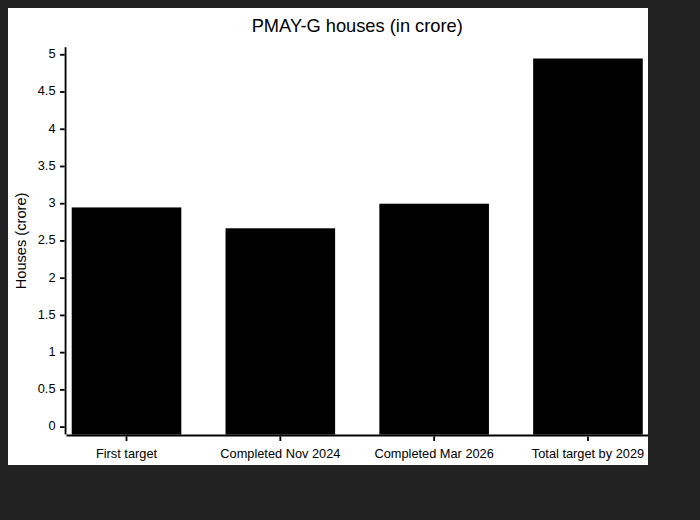
Sources: Government of India (PIB) document of November 2024 for the 2024 figures, and the Drishti IAS summary of official data for March 2026 (“nearly 3 crore”). Always check the latest figures on the official portal.
Official Links You Need
| Page | What it is for | Link |
|---|---|---|
| PMAY-G official portal | Main website of the scheme | pmayg.dord.gov.in |
| MIS Reports page | List of all public PM Awas MIS reports | report.pmayg.dord.gov.in/netiay/newreport.aspx |
| House progress report | Village-wise beneficiary list with names and house status | PhysicalProgressRpt.aspx |
Tip from our checks: The official report pages sometimes do not open on some networks, or from outside India. If a page does not load, try again later, or switch between Wi-Fi and mobile data.
Which PM Awas MIS Report Should You Use?
The MIS reports page has many reports. Most people need only one of these three.
| Report | Best for | Shows names? | Captcha? | Download |
|---|---|---|---|---|
| House progress against the target financial year | Seeing the full beneficiary list of a gram panchayat, with house status and money released | Yes | No | Excel, PDF |
| Beneficiary details for verification (Social Audit Reports) | Social audit and checking a village list for one year | Yes | Yes (simple maths question) | PDF/print |
| Beneficiary search by registration number | Checking the full details of one beneficiary, including payment (FTO) details | Yes (one person) | Varies |
Our advice: Start with “House progress against the target financial year”. It is the easiest, has no captcha, and shows all the important columns in one table.
How to Check PM Awas MIS Report Online (Village-Wise List)
Method 1: House Progress Against the Target Financial Year (Recommended)
This is the simplest way to see the beneficiary list of your gram panchayat.
Step-by-Step Process
- Open the official portal pmayg.dord.gov.in.
- In the menu, go to AwaasSoft and click Report. The MIS reports page opens.
- Under Physical Progress Reports, click “House progress against the target financial year”. You can also open it directly with this link.
- In Fin Year, choose “PMAYG Cumulative progress till date”. This shows houses from all years.
- Leave Scheme as Pradhan Mantri Awaas Yojana Gramin.
- Select your State. Wait for the page to load the districts.
- Select your District, then your Block, then your Panchayat. Wait a moment after each choice.
- Click Submit.
- The list of beneficiaries appears. Press Ctrl + F on a computer (or “Find in page” on mobile) and type your name to find it quickly.
- To save the list, click Download Excel or Download PDF.
What Each Filter Means
| Filter | What to choose | Tip |
|---|---|---|
| Fin Year | “PMAYG Cumulative progress till date” | Pick a single year (for example 2025-2026) only if you want houses of that year alone |
| Scheme | Pradhan Mantri Awaas Yojana Gramin | Usually already selected and cannot be changed |
| State | Your state | Districts load only after you pick a state |
| District | Your district | Blocks load only after you pick a district |
| Block | Your block (development block) | If unsure, ask your Gram Panchayat |
| Panchayat | Your gram panchayat | One panchayat can have several villages |
Method 2: Beneficiary Details for Verification (Social Audit Report)
This report is made for social audits. It also lists beneficiaries with their registration numbers.
Step-by-Step Process
- Open the MIS reports page: report.pmayg.dord.gov.in/netiay/newreport.aspx.
- Find the Social Audit Reports section.
- Click “Beneficiary details for verification”.
- Select your State, District, Block and Gram Panchayat.
- Select the Year and the Scheme (Pradhan Mantri Awaas Yojana Gramin).
- Answer the simple maths captcha (for example, the sum of two numbers).
- Click Submit to see the list. You can print it or save it as PDF.
Good to know: This report usually shows one year at a time. If you don’t know the year of your house, Method 1 with “Cumulative progress till date” is easier.
Method 3: Check One Beneficiary by Registration Number
If you know your PMAY-G registration number (it is printed on your sanction letter and appears in the MIS report), you can see the full details of your house.
- Go to pmayg.dord.gov.in and open the Stakeholders or AwaasSoft menu.
- Choose IAY/PMAYG Beneficiary (beneficiary search).
- Type your registration number and submit.
- If you don’t have the number, use Advanced Search with your state, district, block, panchayat and name.
- The page shows your house details, the instalments released and payment (FTO) details.
How to Read the PM Awas MIS Report
When you open the village list (Method 1), you will see a table with these columns. We have explained each one in simple words.
| Column | What it means |
|---|---|
| #SNo | Serial number in the list |
| Village | The village where the house is being built |
| Reg. No. | The beneficiary’s PMAY-G registration number (for example, a code that starts with your state’s letters) |
| Beneficiary Name | The person who got the house |
| Father’s/Mother’s Name | Helps you tell apart people with the same name (it can be blank) |
| House Alloted To | Whose name the house is in, for example “Joint (Husband and Wife)”, “Woman – Married” or “Woman – Widow” |
| Sanction No. | The sanction order number, with the sanction date in brackets |
| Sanctioned Amount | Total help approved for the house, for example ₹1,20,000 |
| Installment Paid | How many instalments have been paid so far |
| Amount Released | Total money sent to the beneficiary’s bank account so far |
| House Status | How far the house has reached |
What the House Status Means
| House status (examples) | Simple meaning | What happens next |
|---|---|---|
| House Sanctioned | The house is approved | First instalment is released and work can start |
| Foundation / Plinth / Lintel level | Construction is in progress | Officers geo-tag photos and the next instalment is released |
| Roof Cast | The roof has been built | Final work and final instalment |
| Completed | The house is finished | The house is marked complete in AwaasSoft |
The exact status words can differ a little from state to state.
How the Money Moves, Step by Step
The money is not paid all at once. It is paid in parts (instalments) as the house is built. In many states it is three instalments, but the exact split depends on the state.

Example from a real panchayat list we checked: a beneficiary with “Installment Paid: 1” had “Amount Released: ₹40,000”, and one with “Installment Paid: 3” had “Amount Released: ₹1,20,000”. This is how you can match the two columns.
How to Download the PM Awas MIS Report as PDF or Excel
- Open the list using Method 1.
- Above the table, find the Download Excel and Download PDF links.
- Click the one you need. The file will be saved in your Downloads folder.
- On mobile, you can also use your browser’s Share → Print → Save as PDF option.
| Format | Best for |
|---|---|
| Printing, sharing on WhatsApp, keeping a record | |
| Excel | Sorting, filtering, counting houses, searching names easily |
Common Problems and Easy Fixes
| Problem | Why it happens | What to do |
|---|---|---|
| “Data Not Found” | There are no houses for the chosen year in that panchayat | Choose “PMAYG Cumulative progress till date” in Fin Year and submit again |
| District or Block box is empty | The page has not finished loading | Wait a few seconds after each choice. Do not click again and again |
| Website does not open | The server is busy, or your network is blocked | Try again later, or switch between Wi-Fi and mobile data |
| Name not visible in a long list | The list has hundreds of names | Use Ctrl + F (computer) or “Find in page” (mobile) |
| Name spelt differently | Names are typed by officers, sometimes in short form | Search by father’s name, village or registration number |
| Captcha keeps failing (Method 2) | The captcha answer was wrong or expired | Refresh the page and enter the new answer |
| Old links not working | Older report addresses have changed | Use the links given in this article |
Your Name Is Not in the PM Awas MIS Report? Do This
Use this simple checklist before you worry.
- [ ] Did you choose “PMAYG Cumulative progress till date” in Fin Year?
- [ ] Did you pick the correct block and gram panchayat?
- [ ] Did you look at the Village column? Several villages come under one panchayat.
- [ ] Did you try other spellings and the father’s or husband’s name?
- [ ] Did you check with your registration number (Method 3)?
If your name is still missing, it may mean your family is not yet selected. In that case:
- Visit your Gram Panchayat office and ask the Panchayat Secretary or Gram Rozgar Sahayak.
- Ask whether the Awaas+ survey is open in your area and whether your family was surveyed.
- You can also visit the Block Development Office (BDO) with your Aadhaar card and bank details.
How New Families Get Added to PMAY-G
Beneficiaries are chosen from two sources: the SECC 2011 data and the Awaas+ survey lists. Each list is checked and approved by the Gram Sabha.
The new Awaas+ 2024 survey uses a mobile app with Aadhaar-based face authentication. The rules were also updated: there are now 10 exclusion conditions instead of 13, and the monthly income limit was raised to ₹15,000.
| Step | Who does it |
|---|---|
| Survey of the family (Awaas+ 2024 app) | Trained surveyor, or self-survey where allowed |
| Checking the details | Block and district officials |
| Approval of the list | Gram Sabha |
| Sanction of the house | District/block officials in AwaasSoft |
| Name appears in the MIS report | Automatically, after sanction |
Who Is Eligible for PM Awas Yojana – Gramin?
In simple words, PMAY-G is for rural families who do not have a pucca house. This includes families who are homeless, or who live in a kutcha or broken house.
A family is usually not eligible if, for example:
- A member is a government employee
- A member pays income tax
- A member earns more than ₹15,000 a month
- The family has a Kisan Credit Card with a limit of ₹50,000 or more
These are only examples. The full rules are decided by the Ministry of Rural Development, so confirm with your Gram Panchayat or block office.
Tips From Our Own Checks
We tested the “House progress against the target financial year” report for several states in October 2026. Here is what we learned:
- “Cumulative progress till date” works best. When we chose a single new year, many panchayats showed “Data Not Found”. The same panchayats showed full lists when we chose the cumulative option.
- Big panchayats have long lists. One panchayat we checked had 176 beneficiaries. Use Find-in-page or the Excel download to search.
- The page reloads after every choice. Choose one box at a time and wait. Clicking quickly can reset your choices.
- The registration number is your best friend. Names can be spelt in many ways, but the registration number is unique.
- The house status shows the real progress. If your status has not changed for a long time, ask your Gram Panchayat about the next geo-tagging visit.
Stay Safe: Avoid Fake PM Awas Websites and Agents
- The official PMAY-G website ends with .gov.in (pmayg.dord.gov.in).
- Checking the PM Awas MIS Report is always free. Never pay anyone to “add your name” or “show your list”.
- Never share your OTP, bank PIN or Aadhaar OTP with anyone who calls you about PM Awas.
- The money comes directly into your bank account. No agent can speed it up.
- If someone asks for a bribe, report it to your Block Development Officer or the district administration.
Frequently Asked Questions
What is the PM Awas MIS Report?
It is the official online report of PM Awas Yojana – Gramin, made from the AwaasSoft system. It shows beneficiary names, sanctions, money released and house status for every gram panchayat.
How can I check the PM Awas MIS Report online?
Go to pmayg.dord.gov.in → AwaasSoft → Report → “House progress against the target financial year”. Choose “PMAYG Cumulative progress till date”, then your state, district, block and panchayat, and click Submit.
Is the PM Awas MIS Report free to check?
Yes. It is completely free, and you do not need to log in.
Can I check the PM Awas MIS Report on my mobile phone?
Yes. Open the official site in Chrome or any other browser on your phone. Turn the phone sideways to see more columns, and use “Find in page” to search your name.
Which year should I choose in the PM Awas MIS Report?
Choose “PMAYG Cumulative progress till date”. It shows every house from all years. Choose a single year only if you need that year’s list.
Why does the PM Awas MIS Report show “Data Not Found”?
It means there are no houses for the year you selected in that panchayat. Change the year to “PMAYG Cumulative progress till date” and submit again.
How do I download the PM Awas MIS Report as a PDF?
Open the list and click Download PDF above the table. You can also use your browser’s Print option and choose “Save as PDF”.
What does “Installment Paid” mean in the MIS report?
It shows how many instalments of house money have been sent to the beneficiary’s bank account so far. “Amount Released” shows the total money paid.
My house is completed, but the report still says “Roof Cast”. Why?
The status changes only after an officer visits, takes a geo-tagged photo and updates AwaasSoft. Ask your Gram Panchayat or block office to complete the final inspection.
What is the difference between the MIS report and the Awaas+ list?
The MIS report shows families whose houses are already sanctioned. The Awaas+ list is the survey or waiting list of families who may get a house in the future.
Can I apply for PM Awas Yojana – Gramin online?
There is no open online application form for the general public. New families are added through the Awaas+ survey, which is done through the Gram Panchayat and the official mobile app. Contact your Gram Panchayat or block office to know if the survey is open.
Is yojanabot.com an official PM Awas website?
No. yojanabot.com is an independent information website that explains government schemes in simple language. For official work, always use pmayg.dord.gov.in or visit your block office.
Important Links
| What you need | Link |
|---|---|
| Application Form Link (How to apply through the Awaas+ survey) | yojanabot.com – PM Awas Yojana Gramin Apply Guide |
| Official Site | pmayg.dord.gov.in (official PMAY-G portal) |
| PMAYG Beneficiary List Check | yojanabot.com – PMAYG Beneficiary List |
| PM Awas Gramin List 2026-27 | yojanabot.com – PM Awas Gramin List |
| Other Yojana Info | yojanabot.com – All Government Schemes |
| Home Page | yojanabot.com |