Aadhaar is India’s 12-digit identity number, issued by the Unique Identification Authority of India (UIDAI). It is needed for bank accounts, mobile SIMs, government schemes, PAN linking and much more.
Todays guide, you will learn in very simple words how to do Aadhaar card download (including download by mobile number), how to login to myAadhaar, how to update details and do an address change, how to check Aadhaar status, what the Aadhaar PDF password is, and how to check Aadhaar PAN card link status.
| Point | Details |
|---|---|
| Issued by | UIDAI (Unique Identification Authority of India) |
| Download Aadhaar | Free on myAadhaar portal, Aadhaar app, or DigiLocker |
| PDF password | First 4 letters of your name in CAPITALS + year of birth |
| Free online document update | Till 14 June 2027 (on myAadhaar, for proof of identity / address documents) |
| Demographic update fee (name, address, DOB, mobile) | ₹75 |
| Biometric update fee | ₹125 (mandatory updates for children are free) |
| Mobile and address update from home | Possible on the new Aadhaar app with face authentication |
| PAN link | Check on the Income Tax e-filing portal |
| Helpline | 1947 |
| Official portal | Click Here |
Aadhaar Card Download: Step-by-Step
Method 1: Download From myAadhaar Portal
- Open the myAadhaar portal. To open it directly, Click Here.
- Click on “Download Aadhaar”.
- Choose Aadhaar Number, Enrolment ID (EID) or Virtual ID (VID).
- Enter the number and the captcha.
- Click “Send OTP” and enter the OTP sent to your registered mobile number.
- Choose “Masked Aadhaar” if you want only the last 4 digits shown (safer for sharing).
- Click “Verify and Download”. Your e-Aadhaar PDF will be saved.
Method 2: Aadhaar Card Download by Mobile Number (Without Aadhaar Number)
If you have lost your Aadhaar number but your mobile is registered, do this:
- On myAadhaar, click on “Retrieve EID / Aadhaar Number”.
- Choose Aadhaar Number (UID).
- Enter your full name (as in Aadhaar), registered mobile number and captcha.
- Enter the OTP.
- Your Aadhaar number will be sent to your mobile by SMS.
- Now use Method 1 to download your Aadhaar.
Method 3: Aadhaar App or DigiLocker
| Option | How |
|---|---|
| Aadhaar app (UIDAI) | Install the official Aadhaar app, log in with Aadhaar and verification, and view or share your Aadhaar |
| DigiLocker | Log in with your Aadhaar-linked mobile, open “Issued Documents”, and fetch your Aadhaar |
Aadhaar Download Process
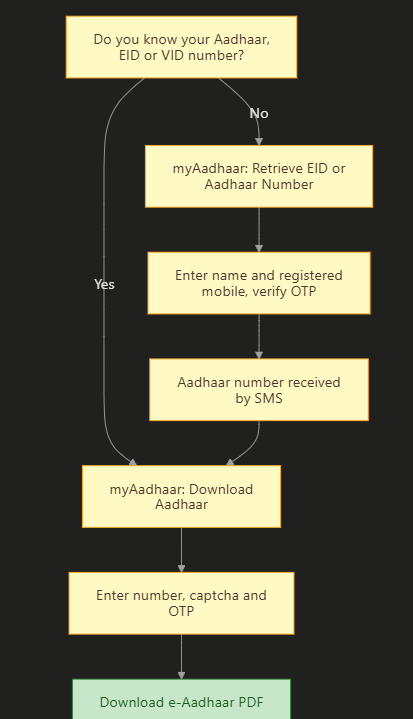
Important: You can download Aadhaar online only if your mobile number is linked with Aadhaar. If it is not, visit an Aadhaar Seva Kendra or use the new Aadhaar app to update your mobile number first.
Aadhaar Card Password (PDF Password)
The downloaded e-Aadhaar PDF is password-protected.
| Rule | Example |
|---|---|
| First 4 letters of your name in CAPITAL letters + your year of birth (YYYY) | Name: SURESH KUMAR, born 1990 → Password: SURE1990 |
| If your name has less than 4 letters, use the full name in capitals + year of birth | Name: RAM, born 1985 → Password: RAM1985 |
Aadhaar Login (myAadhaar)
- Open myaadhaar.uidai.gov.in and click “Login”.
- Enter your Aadhaar number and captcha.
- Click “Login With OTP” and enter the OTP sent to your registered mobile.
- You can now download Aadhaar, update address, check update history, lock/unlock biometrics and more.
Aadhaar Card Update: What Can You Change and Where?
| What you want to update | Where to do it | Fee |
|---|---|---|
| Upload fresh ID and address documents (document update) | myAadhaar portal online | Free till 14 June 2027 |
| Address (with valid proof) | myAadhaar portal or Aadhaar app | ₹75 |
| Mobile number | New Aadhaar app (with face authentication) or Aadhaar Seva Kendra | ₹75 |
| Name, date of birth, gender, email | Aadhaar Seva Kendra (some online where allowed) | ₹75 |
| Photo, fingerprints, iris (biometric) | Aadhaar Seva Kendra only | ₹125 |
| Mandatory biometric update for children (at 5 to 7 and 15 to 17 years) | Aadhaar Seva Kendra | Free |
What does this chart show? Uploading fresh documents online is free till 14 June 2027. Changing details like address or mobile costs ₹75, and changing your photo or fingerprints costs ₹125. Mandatory biometric updates for children are free.
Note on children’s updates: A special waiver made all biometric updates free for children aged 5 to 17 for one year from 1 October 2025. Ask at your Aadhaar centre whether it is still running.
Aadhaar Card Address Change Online
Method 1: myAadhaar Portal
- Login to myAadhaar with your Aadhaar number and OTP.
- Click on “Address Update” and then “Update Aadhaar Online”.
- Select “Address” and click “Proceed to Update Aadhaar”.
- Enter your new address carefully.
- Upload a valid address proof (for example, electricity bill, bank passbook, rent agreement, passport).
- Pay the fee online (₹75) and submit.
- Note your Service Request Number (SRN) to track the status.
Method 2: New Aadhaar App (From Home)
- Download the official Aadhaar app and log in.
- Go to Services and choose Address Update.
- Fill in the new address and upload proof.
- Complete face authentication.
- Pay online and save the request number.
Aadhaar Mobile Number Update
| Way | How it works |
|---|---|
| New Aadhaar app | Choose “Mobile Number Update”, enter the new number, verify, complete face authentication and pay ₹75 |
| Aadhaar Seva Kendra | Fill the update form, give your fingerprint, pay ₹75 |
| India Post (postman / post office service) | Available in many areas for mobile update |
Aadhaar Status Check (Enrolment or Update)
- Open myAadhaar and click on “Check Enrolment and Update Status”.
- Enter your Enrolment ID (EID), Service Request Number (SRN) or Update Request Number (URN).
- Enter the captcha and click Submit.
- The status will be shown (in progress, completed or rejected, with the reason).
Aadhaar PAN Card Link and Link Status
How to Check Aadhaar PAN Card Link Status
- Open the Income Tax e-filing portal. To open it directly, Click Here.
- Click on “Link Aadhaar Status” in Quick Links.
- Enter your PAN and Aadhaar number.
- Click “View Link Aadhaar Status” to see whether they are linked.
How to Link Aadhaar With PAN
- On the e-filing portal, click “Link Aadhaar”.
- Enter your PAN and Aadhaar.
- If the deadline for your PAN has passed, pay the ₹1,000 fee through “e-Pay Tax”.
- Submit the link request with OTP.
Tip: Your name and date of birth must match in Aadhaar and PAN. If they do not match, update one of them first.
Keep Your Aadhaar Safe
- Use Masked Aadhaar when sharing a copy (only the last 4 digits are visible).
- Lock your biometrics on myAadhaar or the Aadhaar app when you do not need them.
- Never share OTP with anyone.
- Check your authentication history on myAadhaar to see where your Aadhaar was used.
Common Mistakes and How to Avoid Them
| Mistake | What happens | How to avoid it |
|---|---|---|
| Mobile not linked with Aadhaar | Cannot download or update online | Update mobile using the Aadhaar app or at an Aadhaar centre |
| Wrong PDF password | PDF does not open | Use first 4 letters of name in capitals + year of birth |
| Uploading unclear documents | Update rejected | Upload clear, full-page scans |
| Paying agents or fake sites | Fraud and data theft | Use only uidai.gov.in, myaadhaar.uidai.gov.in and the official app |
| Ignoring rejection reason | Repeated rejection | Read the reason in status and fix it |
Aadhaar Helpline
| Purpose | Contact |
|---|---|
| UIDAI helpline | 1947 (toll free) |
| help@uidai.gov.in | |
| Book an appointment at Aadhaar Seva Kendra | On the UIDAI website |
| Local help | Aadhaar Seva Kendra, bank or post office Aadhaar centre |
Frequently Asked Questions (FAQ)
How can I do Aadhaar card download?
Go to myaadhaar.uidai.gov.in, click “Download Aadhaar”, enter your Aadhaar number, EID or VID with captcha, verify the OTP on your registered mobile, and download the PDF.
How can I download Aadhaar by mobile number?
If you do not know your Aadhaar number, use “Retrieve EID / Aadhaar Number” on myAadhaar with your name and registered mobile. You will get your Aadhaar number by SMS, and then you can download Aadhaar.
What is the Aadhaar card PDF password?
The first 4 letters of your name in CAPITAL letters followed by your year of birth. For example, SURE1990.
How can I login to myAadhaar?
Open myaadhaar.uidai.gov.in, click Login, enter your Aadhaar number and captcha, and login with the OTP sent to your registered mobile.
How can I do Aadhaar card address change online?
Login to myAadhaar, choose “Address Update”, enter the new address, upload valid proof, pay ₹75 and submit. You can also use the new Aadhaar app with face authentication.
Is Aadhaar update free in 2026?
Online document update (uploading fresh ID and address documents) on myAadhaar is free till 14 June 2027. Demographic updates cost ₹75, and biometric updates cost ₹125.
How can I update my mobile number in Aadhaar?
Use the new Aadhaar app (with face authentication) or visit an Aadhaar Seva Kendra. The fee is ₹75.
How can I check Aadhaar update status?
On myAadhaar, click “Check Enrolment and Update Status”, enter your EID, SRN or URN with captcha, and submit.
How can I check Aadhaar PAN card link status?
On the Income Tax e-filing portal, click “Link Aadhaar Status”, enter your PAN and Aadhaar, and view the status.
What is masked Aadhaar?
It is an Aadhaar copy that shows only the last 4 digits of your Aadhaar number. It is safer to share.
Can I update my photo online?
No. Photo and other biometric updates must be done at an Aadhaar Seva Kendra.
Is e-Aadhaar valid like the original card?
Yes. The downloaded e-Aadhaar is as valid as the physical Aadhaar letter.
What is the Aadhaar helpline number?
Call 1947 (toll free) or email help@uidai.gov.in.
Sources We Used
- UIDAI / myAadhaar: download, retrieve Aadhaar, update and status services
- Outlook Money: free online document update extended till 14 June 2027 (May 2026)
- Business Today: Aadhaar fee structure and digital updates from November 2025
- Business Today: updating address and mobile on the new Aadhaar app (July 2026)
- News on AIR: waiver of biometric update charges for children aged 5 to 17 (October 2025)
- Income Tax e-filing portal: Link Aadhaar and Link Aadhaar Status
Important Links
These important links are collected for you by yojanabot.com. Click on any link to open the page.
| What You Need | Link |
|---|---|
| Application Form (Aadhaar Update on myAadhaar) | Click Here |
| Official Site (UIDAI) | Click Here |
| Aadhaar Card Download and Login | Click Here |
| Aadhaar PAN Link Status | Click Here |
| Aadhaar in DigiLocker | Click Here |
| PAN Card Apply and Download | Click Here |
| Other Yojana Schemes | Click Here |
| Home Page | Click Here |
2 comments