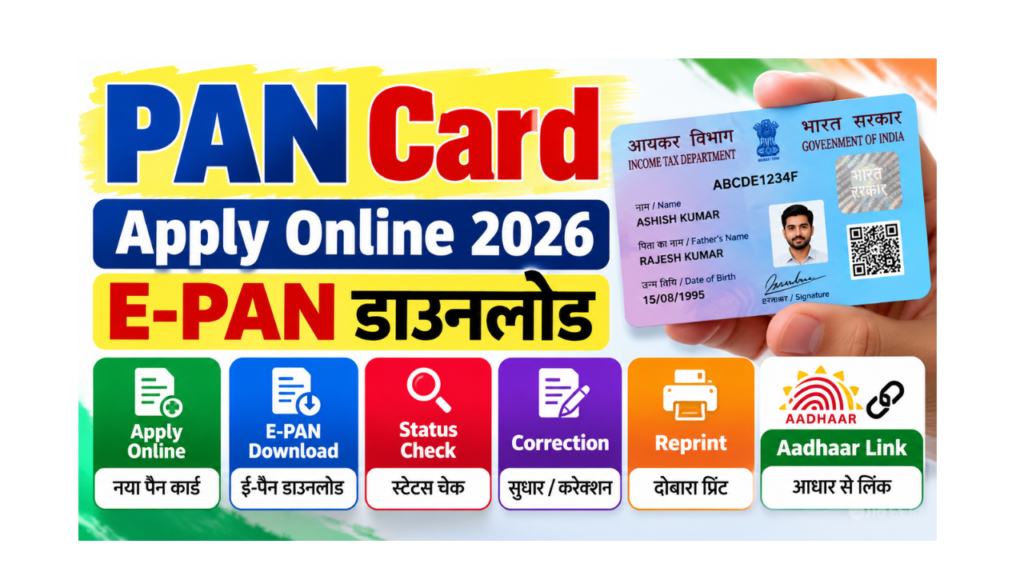
A PAN card (Permanent Account Number) is a 10-character ID given by the Income Tax Department. You need it to open a bank account, file income tax returns, buy property, invest in mutual funds and do many other money-related work.
In this guide, you will learn in very simple words how to do PAN card apply online, how to do PAN card download (e-PAN), how to check PAN card status, how to do PAN card correction and reprint, and how to check your Aadhaar-PAN link status. We also explain what PAN 2.0 means for you.
| Point | Details |
|---|---|
| Issued by | Income Tax Department, Government of India |
| PAN service agencies | Protean (formerly NSDL e-Gov) and UTIITSL |
| Free instant e-PAN | Yes, on the Income Tax e-filing portal using Aadhaar |
| New PAN fee (physical card + e-PAN) | About ₹107 (Indian address) |
| e-PAN only fee | About ₹72 |
| Reprint / correction fee | About ₹50 (Indian address) |
| Time for instant e-PAN | Usually within minutes |
| Aadhaar link | Compulsory; unlinked PAN becomes inoperative |
| Penalty for late linking | ₹1,000 |
| PAN 2.0 | Old PAN cards remain valid; upgrade is not mandatory |
| Official portal | Click Here |
What Is PAN 2.0?
In November 2024, the government approved PAN 2.0, a project to upgrade PAN services with a single unified portal, QR-code PAN cards and faster digital services.
- Your existing PAN card remains valid. You do not need to apply for a new one.
- As of mid-2026, PAN services continue on the existing portals (Income Tax e-filing, Protean and UTIITSL) while the new unified system is being rolled out.
- New cards come with a QR code that helps verify your details.
Ways to Get a PAN Card
| Method | Fee | Time | Best for |
|---|---|---|---|
| Instant e-PAN (Income Tax e-filing portal) | Free | Usually minutes | Individuals with Aadhaar linked to mobile, who do not have a PAN |
| Protean (NSDL) online | About ₹107 (physical + e-PAN), about ₹72 (e-PAN only) | Usually about 2 weeks for physical card | Anyone who wants a physical card |
| UTIITSL online | Similar to Protean | Usually about 2 weeks for physical card | Anyone who wants a physical card |
| Offline (Form 49A at PAN centre) | Similar to online | Longer | People who prefer paper forms |
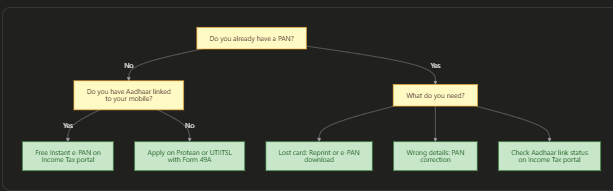
Which PAN Service Do You Need?
Documents Required for PAN Card Apply
| Document | Purpose | Examples |
|---|---|---|
| Proof of identity | Shows who you are | Aadhaar, voter ID, passport, driving licence |
| Proof of address | Shows where you live | Aadhaar, bank statement, electricity bill, passport |
| Proof of date of birth | Shows your age | Aadhaar, birth certificate, 10th marksheet, passport |
| Photo and signature | For the physical card | Recent passport-size photo |
| Aadhaar | Needed for e-KYC and instant e-PAN | Aadhaar with linked mobile number |
Tip: If you have Aadhaar with a linked mobile number, you can complete everything online with Aadhaar OTP (e-KYC), and you do not need to send any paper documents.
PAN Card Apply Online: Step-by-Step
Method 1: Free Instant e-PAN (Income Tax Portal)
This is the fastest and free way for individuals who do not have a PAN.
- Open the Income Tax e-filing portal. To open it directly, Click Here.
- Click on “Instant e-PAN” in the Quick Links.
- Click “Get New e-PAN”.
- Enter your Aadhaar number and tick the confirmation box.
- Enter the OTP sent to your Aadhaar-linked mobile.
- Check your details from Aadhaar and submit.
- Your e-PAN is usually ready in a few minutes. Download it from the same page using “Check Status / Download PAN”.
Method 2: Apply on Protean (NSDL) Portal
- Open the Protean PAN services website. To open it, Click Here.
- Choose “Apply for New PAN” (Form 49A for Indian citizens).
- Select category (Individual) and fill in your name, date of birth, email and mobile.
- Choose “Submit digitally through e-KYC and e-Sign” (paperless, using Aadhaar OTP).
- Choose whether you want a physical PAN card or e-PAN only.
- Pay the fee online.
- Complete Aadhaar OTP e-KYC and e-Sign.
- Save the acknowledgement number for status checks.
Method 3: Apply on UTIITSL Portal
- Open the UTIITSL PAN portal. To open it, Click Here.
- Choose “Apply for New PAN Card (Form 49A)”.
- Choose digital mode (Aadhaar e-KYC) and fill in your details.
- Pay the fee and complete e-KYC.
- Save the application coupon number.
PAN Card Fees 2026
| Service | Indian address | Foreign address |
|---|---|---|
| New PAN (physical card + e-PAN) | About ₹107 | About ₹1,017 |
| New PAN (e-PAN only) | About ₹72 | About ₹72 |
| Correction / change in details | About ₹50 | About ₹959 |
| Reprint of PAN card | About ₹50 | Higher (postal charges extra) |
| Instant e-PAN on Income Tax portal | Free | Not applicable |
What does this chart show? The instant e-PAN on the Income Tax portal is free, so it is the best choice if you only need a PAN number quickly. Pay for a physical card only if you need the plastic card.
PAN Card Status Check
| Where you applied | How to check status |
|---|---|
| Instant e-PAN (Income Tax portal) | “Instant e-PAN” then “Check Status / Download PAN”, enter Aadhaar and OTP |
| Protean (NSDL) | “Track PAN status” on the Protean website, enter acknowledgement number |
| UTIITSL | “Track PAN Card” on the UTIITSL website, enter application coupon number or PAN |
Steps for Protean Status Check
- Open the Protean PAN website and click on “Track PAN / TAN Application Status”.
- Choose “PAN – New / Change Request”.
- Enter your acknowledgement number and the captcha.
- Click Submit to see your status (for example, under process, dispatched, or allotted).
PAN Card Download (e-PAN)
Option 1: From the Income Tax Portal (for Instant e-PAN)
- Open the Income Tax e-filing portal and click “Instant e-PAN”.
- Click “Check Status / Download PAN”.
- Enter your Aadhaar number and OTP.
- Download the e-PAN PDF.
Option 2: From Protean or UTIITSL
| Agency | How to download | Fee |
|---|---|---|
| Protean (NSDL) | “Download e-PAN” option; enter PAN / acknowledgement number, Aadhaar (if linked) and date of birth; get OTP | Free within a limited time after allotment, then a small fee (about ₹8.26) |
| UTIITSL | “Download e-PAN” option; enter PAN and date of birth; get OTP | Free within a limited time after allotment, then a small fee |
Note: The e-PAN PDF is password-protected. The password is usually your date of birth in DDMMYYYY format.
PAN Card Correction (Change in Details)
You can correct your name, date of birth, father’s name, photo, signature, address, mobile or email.
- Open the Protean or UTIITSL website (the agency through which your PAN was made, or either one).
- Choose “Changes or Correction in existing PAN data / Reprint of PAN Card”.
- Enter your PAN and choose the details you want to change.
- Upload proof for the change (for example, Aadhaar for name or date of birth, marriage certificate for name change after marriage).
- Pay the fee (about ₹50 for Indian address).
- Complete Aadhaar e-KYC / e-Sign.
- Save the acknowledgement number and track the status.
Tip: Your name and date of birth in PAN should match your Aadhaar. If they do not match, PAN-Aadhaar linking may fail.
PAN Card Reprint (Lost or Damaged Card)
If your PAN card is lost or damaged, but your details are correct, you can order a reprint.
- Open the Protean or UTIITSL website.
- Choose “Reprint of PAN Card”.
- Enter your PAN, Aadhaar and date of birth.
- Verify with OTP.
- Pay about ₹50 (Indian address).
- The new card is posted to your address. You can also download the e-PAN for immediate use.
Aadhaar PAN Link and Link Status Check
Linking PAN with Aadhaar is compulsory. If your PAN is not linked, it becomes inoperative. An inoperative PAN means you cannot use it properly for tax filing, banking and investments, and higher TDS may be deducted.
| Point | Details |
|---|---|
| Deadline for most PAN holders | 30 June 2023 (already over) |
| Deadline for PAN made using an Aadhaar enrolment ID | 31 December 2025 (already over) |
| Late fee to link now | ₹1,000 |
| Where to link | Income Tax e-filing portal (“Link Aadhaar”) |
| Time to become operative again | About 7 to 30 days after paying and linking |
How to Check Aadhaar PAN Link Status
- Open the Income Tax e-filing portal. To open it directly, Click Here.
- Click on “Link Aadhaar Status” in Quick Links.
- Enter your PAN and Aadhaar number.
- Click “View Link Aadhaar Status”.
- The screen shows whether your PAN is linked or not linked.
How to Link Aadhaar With PAN (If Not Linked)
- On the e-filing portal, click “Link Aadhaar”.
- Enter your PAN and Aadhaar.
- If asked, pay the ₹1,000 fee through “e-Pay Tax”.
- After the payment is processed, submit the link request with OTP.
- Check the status after a few days.
Common Mistakes and How to Avoid Them
| Mistake | What happens | How to avoid it |
|---|---|---|
| Name or date of birth different from Aadhaar | e-KYC or Aadhaar link fails | Correct Aadhaar or PAN first so both match |
| Applying for a second PAN | Having two PANs is not allowed and can attract a penalty | If you have a PAN, use reprint or correction, not a new application |
| Using fake websites | Data theft or money loss | Use only incometax.gov.in, Protean or UTIITSL websites |
| Ignoring Aadhaar link | PAN becomes inoperative | Check link status and link it |
| Forgetting the acknowledgement number | Cannot track status | Save or screenshot it |
PAN Helpline
| Purpose | Contact |
|---|---|
| Income Tax e-filing helpline | 1800-103-0025 / 1800-419-0025 |
| Protean (NSDL) PAN helpline | 020-27218080 |
| UTIITSL PAN helpline | Contact details on the UTIITSL PAN website |
Frequently Asked Questions (FAQ)
How can I apply for a PAN card online?
If you have Aadhaar linked to your mobile, use the free Instant e-PAN on the Income Tax e-filing portal. For a physical card, apply on the Protean (NSDL) or UTIITSL website with Aadhaar e-KYC and pay the fee.
How can I do PAN card download?
For Instant e-PAN, go to the Income Tax e-filing portal, click “Instant e-PAN”, then “Check Status / Download PAN”, and verify with Aadhaar OTP. For PAN made through Protean or UTIITSL, use their “Download e-PAN” option.
How can I check PAN card status?
On the Protean website, use “Track PAN Status” with your acknowledgement number. On UTIITSL, use “Track PAN Card”. For Instant e-PAN, use “Check Status / Download PAN” on the Income Tax portal.
What is the PAN card fee in 2026?
A new PAN with physical card and e-PAN costs about ₹107 for an Indian address, and e-PAN only costs about ₹72. Instant e-PAN on the Income Tax portal is free.
How can I do PAN card correction online?
Go to Protean or UTIITSL, choose “Changes or Correction in existing PAN data”, enter your PAN, select the details to change, upload proof, pay about ₹50 and complete Aadhaar e-KYC.
How can I get a PAN card reprint?
Choose “Reprint of PAN Card” on Protean or UTIITSL, enter your PAN, Aadhaar and date of birth, verify the OTP and pay about ₹50. The card is posted to your address.
Is PAN 2.0 mandatory?
No. Your existing PAN card remains valid. PAN 2.0 is an upgrade of the system, and you do not need to apply for a new PAN.
How can I check Aadhaar PAN link status?
On the Income Tax e-filing portal, click “Link Aadhaar Status”, enter your PAN and Aadhaar, and view the status.
What happens if my PAN is not linked with Aadhaar?
Your PAN becomes inoperative. You may face higher TDS and problems in tax filing and banking. You can link it now by paying a ₹1,000 fee.
What is the password of e-PAN PDF?
It is usually your date of birth in DDMMYYYY format (for example, 15081995).
Can I have two PAN cards?
No. Having more than one PAN is not allowed and can attract a penalty. If you have two, surrender the extra one through the correction form.
How long does it take to get a PAN card?
Instant e-PAN usually comes in a few minutes. A physical PAN card usually reaches you in about two weeks after successful application.
Is a PAN card needed for students?
A student needs a PAN when opening certain bank accounts, investing, or earning taxable income. Minors can also get a PAN, applied through a parent.
Sources We Used
- PIB: PAN 2.0 approval and features (November 2024)
- CA Club India: PAN 2.0 status in 2026 and current application routes
- Protean: PAN fees for new application, correction and reprint
- Outlook Money: PAN-Aadhaar linking deadline, penalty and reactivation
- Income Tax e-filing portal: Instant e-PAN and Link Aadhaar services
Important Links
These important links are collected for you by yojanabot.com. Click on any link to open the page.
| What You Need | Link |
|---|---|
| Application Form (Free Instant e-PAN, Income Tax Portal) | Click Here |
| Official Site (Income Tax e-Filing Portal) | Click Here |
| Apply / Correction / Reprint (Protean, formerly NSDL) | Click Here |
| Apply / Correction / Reprint (UTIITSL) | Click Here |
| Other Schemes | Click Here |
| Home Page | Click Here |
2 comments